


















A Customized Google Analytics 4
Setup Built Around Your Business
We build custom GA4 tracking setups based on your business goals. Our Google Analytics consulting covers GA4 implementation for Shopify, WordPress, WooCommerce, Magento, as well as custom-built solutions.
We also provide recommendations focused on ecommerce performance analytics, helping you connect data to real business decisions.
Platforms




Google Analytics 4 Base Configuration
By setting up the Google Analytics 4 base configuration, you get a clear and reliable view of how users interact with your website. This includes traffic patterns, user behavior, interests, and purchases. This makes it easier to evaluate page performance and identify where improvements will have the most impact.

Based on this data, you’ll be able to see:
- which sections of the site attract the most visitors;
- how much time users spend on each section;
- the advertising campaign that brought the visitor to your site;
- where your visitors are coming from geographically.
Google Analytics 4 Standard configuration
Google Analytics 4 allows you to configure tracking in varying levels of detail, depending on your goals. In the base configuration, the user sees only basic summaries of information, but in the customized configuration, you can track specific interactions and metrics that matter to your business.

With the standard configuration, you can track:
- website traffic and source distribution;
- user location, devices, and platforms used;
- top landing pages and key engagement events;
- advertising campaign performance;
- detailed visualization of e-commerce purchases and shopping journey steps through reports;
- key events across the user visit path.
Contact clicks
Find out how many visitors contact you by clicking your phone number or email address directly from your website.
Button clicks
Track how visitors interact with key buttons such as purchase, contact, or navigation CTAs, and measure which actions drive results.
Shopping journey visualization
Visualize how customers move through your website during the buying process, where they hesitate, and where they drop off. This insight helps identify friction points and improve the overall user experience.
User engagement
Engagement metrics (e.g. clicks, views, comments, time spent on page sections) help you understand audience interest and adjust content or offers accordingly.
Contact form submissions
Find out how many website visitors complete the contact form, how many contact forms are left incomplete, which fields are ignored, and which fields cause friction or errors.
Page scroll tracking
Measure how far visitors scroll on your pages and which sections are actually seen. Unlike basic GA4 setups, custom tracking lets you analyze scroll depth even in smaller increments (starting from 25%).
Google Analytics 4 Advanced Configuration
Advanced GA4 configuration enables deeper tracking of specific user actions and ecommerce behavior. This provides more detailed insight into how users move through your site, where they drop off, and what drives purchases.

While the standard GA4 configuration shows essential summaries of traffic and shopping activity, the enhanced configuration allows you to set up additional, specialized measurements and access significantly more detailed reports.
- Detailed visualisation of e-commerce shopping journey steps in graphical form (Free Form, Funnel reports), including all key actions that lead to completed purchases.
- Specialized visualization of user visit paths and key events (Free Form, Funnel reports) that result in conversions aligned with business goals, such as contact form submissions or completed orders.
- Creation of tailored reports in the GA4 platform (GA4 Report Library). In addition to standard reports such as Traffic Acquisition, Purchase Journey, Events, Pages & Screens, we build reports that align with your specific business objectives.
- Development of visualization reports for user behavior and e-commerce journey events using the Looker Studio platform.
Reporting and data visualization
Advanced GA4 reporting
Compared to previous GA versions, GA4 provides more detailed, event-based reports tied to individual user actions. You can track precise interactions, time spent on pages, and purchase behavior across both web and mobile platforms in a single view.
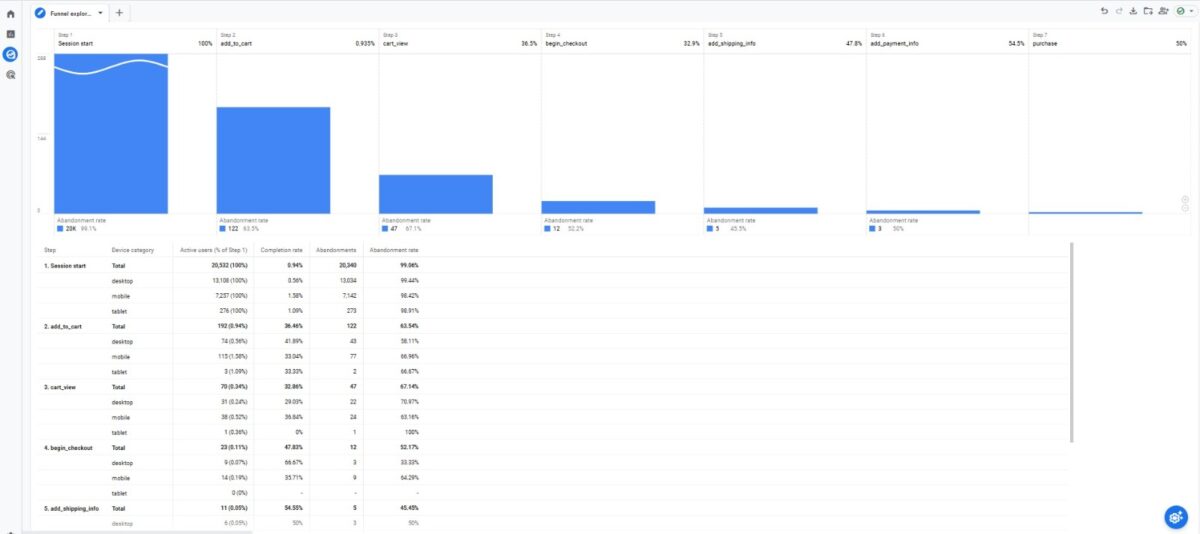
Key benefits of advanced reporting include:
- custom reports tailored to your business needs;
- integration with third-party visualization tools such as Looker and BigQuery;
- data-driven decisions based on accurate, reliable metrics.
Data visualization with Looker Studio
Looker Studio is a powerful, easy-to-use data visualisation tool that helps turn raw analytics data into clear insights. It allows you to combine multiple data sources — such as Google Analytics, Google Ads, Search Ads, Facebook Ads, BigQuery, and MySQL – into interactive dashboards.
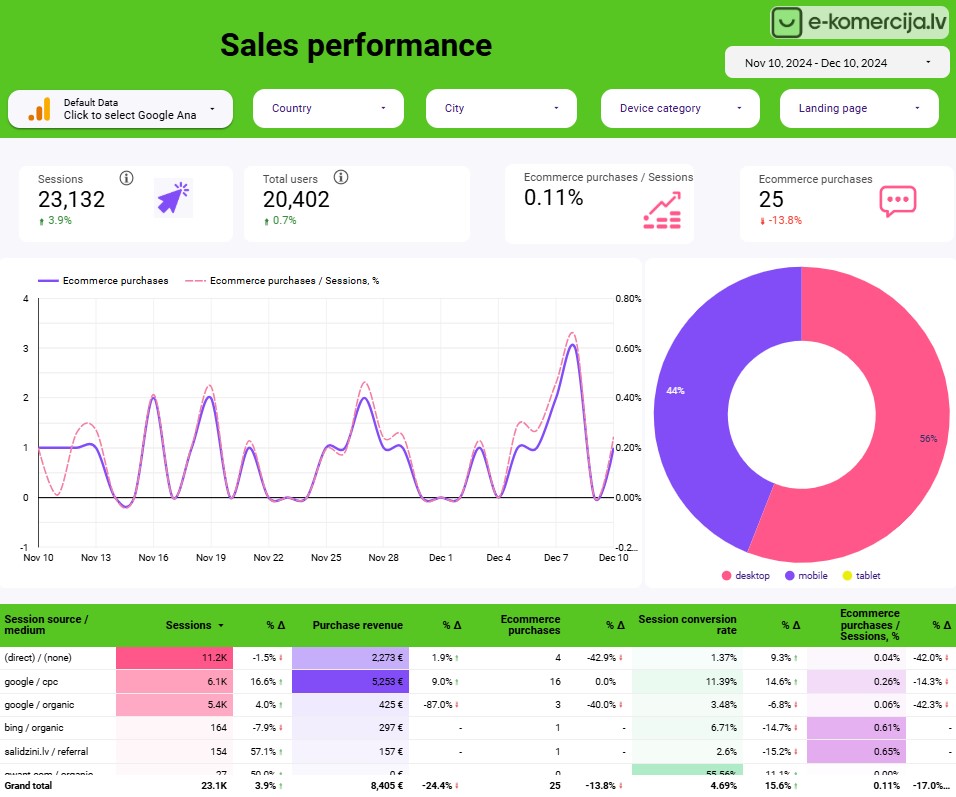
- free and accessible for all Google users;
- interactive charts, tables, maps, and graphs that are easy to customize and edit;
- no programming knowledge required;
- accessible on desktop, tablet, and mobile devices;
- fully customizable designs to match your brand or reporting needs.
Multi-channel data access
Combine data from advertising, communication, and offline interactions into one reporting system. Analyze performance across Google Ads, Facebook, Instagram, TikTok, phone calls, emails, and in-person visits.
Custom dashboards
View only the data that matters to you using filters, time ranges, or real-time reporting.
With custom dashboards, you can quickly identify key performance indicators (KPIs), track business performance, and measure marketing, sales, and other critical results.
Hierarchical reports
Analyze multiple data sets to see how categories and sub-categories connect, and how campaign performance changes by region, product, or time period. You can view total sales by country and drill down to city-level sales with one click.
Product analysis
Identify your best- and worst-performing products. Compare product groups, analyze sales over time, evaluate price changes, and measure the impact of marketing actions on product performance.
Security and data protection
Looker Studio follows Google’s security standards. All data transfers are encrypted using TLS (Transport Layer Security), ensuring safe data handling between systems.
Easy to use in a team
Real-time editing allows multiple team members to work together without disrupting workflows. Reports can be shared, access can be restricted, and insights distributed securely across teams.
See how Google Analytics consulting can improve your business
The eComStrive team is ready to answer your questions and help you get real value from your analytics.
How Google Analytics Setup Works
We configure the analytics system based on your business goals so you can track the metrics that matter most. This may include detailed traffic data, number of purchases, abandoned carts, top-selling products, most effective marketing campaigns, content engagement, audience data, and more.
01. Defining KPIs
We align with you on the KPIs (key performance indicators) to track. Where helpful, we also recommend industry-standard KPIs such as purchases, sign-ups, abandoned carts, and conversion events.
02. Configuration
We configure the analytics system according to the agreed KPIs. This includes tracking campaign performance, downloads, purchases, applications, and other key actions relevant to your business.
03. Validation and adjustments
After the analytics system is set up, we run multiple tests to verify that everything works correctly. We monitor data accuracy, check tracking consistency, and make adjustments where needed to ensure reliable results.
Flexible Support for Small Businesses
Do you need occasional support from GA4 specialists and/or help with Looker reports? We’re here to help!
Google Analytics
|
Looker Studio reportsCustom reports that make it easy to track performance, spot trends, and evaluate results. |

What clients say about their experience


How Much Does Google Analytics 4 Setup Cost?
We’ve outlined typical starting prices for each GA4 setup level. Final pricing is confirmed after a short consultation, based on your business model, tracking needs, and data complexity.
Google Analytics base configuration
- Pageview & built-in event tracking via GTM
Provides data on:
- Website traffic and traffic sources
- User locations, devices, and platforms
- Top landing pages and engagement events
- For advertising campaigns
Google Analytics 4 Standard configuration
- Pageview & built-in event tracking via GTM
- Enhanced Ecommerce data layer
- Enhanced Ecommerce events tracking
- Custom GA4 event tracking
Provides data on:
- Website traffic and traffic sources
- User locations, devices, and platforms
- Top landing pages and engagement events
- For advertising campaigns
- Detailed visualizations of e-commerce purchases and shopping journey steps
- For specialized user visit path events
Google Analytics 4 Advanced Configuration
- Pageview & built-in event tracking via GTM
- Enhanced Ecommerce data layer
- Enhanced Ecommerce events tracking
- Custom GA4 event tracking
- Customized reports adapted for business needs
- Customized Explore section reports
- Customized Looker Studio dashboard
Provides data on:
- Website traffic and traffic sources
- User locations, devices, and platforms
- Top landing pages and engagement events
- For advertising campaigns
- Detailed visualizations of e-commerce purchases and shopping journey steps
- For specialized user visit path events
- For customized reports on the GA4 platform
- For customized reports on the Looker Studio platform
* Prices exclude VAT
Other Services

Technical SEO audit
Our SEO audit services uncover technical, structural, and content issues that limit search visibility. You get clear priorities, practical fixes, and a roadmap built to help you reach the top positions in Google Search results.

SEO services
Our SEO services focus on long-term visibility and qualified traffic growth. We build search strategies around intent, competition and site health to help your company rank higher on Google.

Keyword research
We offer keyword research services grounded in real search behavior and competitive data. Insights are used to guide SEO strategy, content planning, and advertising campaigns.
Frequently Asked Questions
What is Google Analytics 4?
Google Analytics 4 (GA4) is the latest version of Google Analytics. It replaces Universal Analytics and enables more advanced data collection and analysis across websites and apps. GA4 focuses on user behavior, privacy, and cross-device tracking. It allows you to track events such as clicks, video views, scrolling, and purchases, giving you more accurate insight into how visitors interact with your site and what improvements matter most.
How can I be sure that my data is accurate?
To ensure data accuracy, we run detailed checks after the GA4 and Google Tag Manager setup. This includes validating page views and event tracking using browser testing tools to confirm that data is recorded correctly in GA4. If needed, we apply filters to remove internal traffic or unwanted referrals and make additional adjustments so the data reflects real user behavior as accurately as possible.
Will the system be checked after GA4 installation?
Yes. After the GA4 installation, we test the setup to confirm that tracking is working correctly and that data is being collected in real time without errors.
Can GA4 track specific actions such as file downloads or external link clicks?
Yes. GA4 can track these actions. This type of tracking is included as part of a advanced configuration/customized Google Analytics setup.
How can I find out if I need additional tracking or extensions?
Our team is always available to advise you. We’ll review your business goals and data needs, then recommend any additional tracking, extensions, or custom events required to collect the right statistics for your use case.
Sazinieties ar mums
Mūsu komanda priecāsies atbildēt uz visiem Jums interesējošiem jautājumiem. Aizpildiet kontaktu formu, un mēs ar Jums sazināsimies.