


Shopping Cart Abandonment: A Complete Guide for Ecommerce
Most online shoppers do not buy the first time they show interest. They browse, compare, hesitate, check shipping, look for coupon codes, and sometimes leave with every intention of coming back later.
Roughly 7 in 10 online carts are abandoned and every unfinished cart leaves revenue sitting just out of reach. Some shopping cart abandonment is unavoidable, especially when shoppers are only researching or comparing options. But a large share comes from fixable issues in the buying journey.
This guide explains what shopping cart abandonment is, how to calculate it, why shoppers leave, and how to use behavior signals, checkout improvements, and recovery strategies to reduce lost sales.
- What Is Shopping Cart Abandonment?
- How Common Is Cart Abandonment? Stats & Benchmarks
- User Behavior and Cart Abandonment Signals
- 8 Common Cart Abandonment Signals
- Why Do Shoppers Abandon Their Carts?
- The Impact of Cart Abandonment on Ecommerce Businesses
- 9 Strategies to Reduce Cart Abandonment
- Abandoned Cart Recovery Strategies
- Cart Abandonment Tools And Software
- Reduce Cart Abandonment by Understanding Why It Happens
What Is Shopping Cart Abandonment?
Ecommerce shopping cart abandonment happens when a visitor adds products to their online cart but leaves the site before completing the purchase. The intent to buy is there, but something interrupts or delays the final step.
From a business perspective, these sessions represent missed conversions. The shopper has already moved past browsing and into consideration, yet the transaction never closes. That makes cart abandonment one of the clearest signals of friction in the buying process.
Cart Abandonment vs Checkout Abandonment: What’s the Difference?
The difference between cart abandonment and checkout abandonment is where the customer exits the purchase process.
- Cart abandonment happens when a shopper adds items to their cart during browsing but leaves before entering checkout. This stage can reflect hesitation, comparison behavior, or unresolved questions about the product.
- Checkout abandonment happens after the customer has already started the checkout process but does not complete the purchase. At this point, drop-offs are more directly tied to friction in the transaction itself, such as unexpected costs, limited payment options, or a complicated flow.
Both types are driven by friction, but at different moments in the journey. Tracking them separately allows specific metrics to pinpoint where users exit and what is causing them to drop off at that stage.
How Common Is Cart Abandonment? Stats & Benchmarks
Online cart abandonment is a consistent problem across the ecommerce industry. Data from Statista shows a global abandonment rate of 70.22% in 2026, meaning most users who add items to a cart do not complete the purchase.
Mobile abandonment is significantly higher at 80.02%, compared to 66.41% on desktop. This is likely linked to usability limitations and higher interruption rates on mobile devices (e.g, users switching apps, answering calls).
Abandonment rates vary across industries as well. Categories with higher prices or more complex decision-making, such as travel, automotive, or luxury goods, tend to see more carts left behind. In contrast, grocery and essential goods typically have lower abandonment rates because purchases are driven by immediate need and clearer intent.
How to Calculate Your Shopping Cart Abandonment Rate
Shopping cart abandonment rate measures how many users start the purchase process but do not finish it.
To calculate it, take the number of completed purchases and divide it by the total number of carts created. Then subtract that value from one and multiply by 100 to get the percentage of abandoned carts.
For example, if your store records 50 completed orders and 250 carts created, the calculation would look like this:
(1 – (50 / 250)) × 100 = 80%
This means 80% of users who showed purchase intent by adding items to their cart did not complete the transaction.
Tracking this metric over time will give you a clear baseline for how your checkout flow is performing. When you compare changes in abandonment rate against updates to pricing, UX, or site performance, you can better understand which decisions are helping users complete their orders and which ones are giving them a reason to leave.
For more insight into how to properly analyze and interpret cart abandonment rate, check out our full guide on cart abandonment rate.
If you are looking for more advanced tracking to glean clearer insights into user behavior, consider our Web Analytics services.

User Behavior and Cart Abandonment Signals
Cart abandonment signals are the actions users take before leaving without completing a purchase.
These behaviors give context to the decision not to buy. Instead of treating abandonment as a single event, it helps to look at the sequence leading up to it. Small interactions during a session can point to hesitation or uncertainty.
When you track these patterns, you can start to identify where the experience breaks down. That might mean adjusting product content, improving reassurance during checkout, or introducing well-timed prompts that help users move forward.
For more insight into how to track and interpret cart abandonment signals across the customer journey, check out our full guide on this topic.
8 Common Cart Abandonment Signals
Before shoppers abandon their cart, they may show small changes in behavior that suggest they are unsure or holding back. The order below starts with signals closest to purchase. The first few usually point to high-intent shoppers hitting friction, while the later ones are more often tied to research or early-stage hesitation:
- Leaving shortly after delivery/shipping costs are shown
- Looking for discount codes before completing payment
- Staying inactive on the checkout page for an extended period
- Changing quantities or updating the cart several times
- Comparing similar products multiple times before proceeding
- Going back and forth between reviews, FAQs, or product details
- Repeatedly enlarging or inspecting product images
- Moving between devices during the same buying session
When a shopper shows several of these behaviors in one session, there is a much higher chance they will leave without completing the purchase.
Pro Tip:
Unfortunately, many ecommerce businesses just don’t have the right analytics in place to identify these signals. Tools like Google Analytics can help by showing how users move through the site and where they exit the process. Without this kind of data, it’s much harder to know which changes will meaningfully improve the shopping experience.
Why Do Shoppers Abandon Their Carts?
Shoppers leave their carts for a mix of pricing concerns, missing information, and friction in the buying process. Identifying which of these applies to your store allows you to make targeted and strategic changes, instead of adjusting things at random and hoping something improves.
The most common causes usually fall into four areas:
Product Issues:
- Conflicting or unclear product details
- Thin or incomplete product descriptions
- Poor-quality or missing images and videos
- Items going out of stock
- Using the cart as a way to research or save item
Trust Issues:
- Limited or negative reviews
- Concerns about payment security
- Low trust in the brand or site
- Return policies that are hard to understand
Pricing Issues:
- Prices that feel too high compared to alternatives
- Extra costs appearing late in the process
- High delivery fees
- No available discounts or promo codes
Checkout Issues:
- Checkout flows that take too long or feel complicated
- Not enough payment methods
- Forced account registration before purchase
- Slow-loading pages or technical issues
- Poor mobile experience
The issue is not always the price or the checkout flow. In many cases, users abandon their carts because they don’t have enough product information.
eComStrive often finds that better product pages can reduce a lot of this uncertainty. Multiple high-quality images, clear descriptions, and key specifications help users feel more confident about the purchase. When that information is missing, shoppers are more likely to leave and keep researching elsewhere.
For example, your pricing might be similar to a competitor’s, but if another store shows the product more clearly and gives shoppers a stronger sense of what they will receive, customers may feel more confident buying from them instead.
Why Are Product Description Important?
When browsing online, looking for a product, you probably read several descriptions before choosing. Have you ever wondered why product descriptions are…
Abandonment usually has more than one cause. That’s why businesses should address the full customer journey from product page to payment. A stronger strategy looks for improvements across product, pricing, trust, and checkout.
The Impact of Cart Abandonment on Ecommerce Businesses
Cart abandonment affects more than the order that was not completed. When users repeatedly leave before buying, it can create problems across your business – impacting marketing, operations, and customer retention.

Common business impacts include:
- Direct revenue loss
- Higher acquisition costs when paid traffic doesn’t convert
- Missed opportunities to turn first-time visitors into repeat customers
- Inventory planning issues when demand signals don’t translate into orders
- Feedback void when drop-offs are not properly analyzed
- Competitive pressure when users leave and buy elsewhere
- Negative brand perception tied to a frustrating experience
Cart abandonment can also distort how the business reads performance. A product may look popular because many users add it to their carts, but if those carts rarely turn into orders, inventory planning, ad spend, and merchandising decisions can all be based on incomplete signals.
A smoother checkout does more than lift conversions. It protects the value of the traffic you already paid for and gives customers fewer reasons to choose a competitor the next time they shop.
9 Strategies to Reduce Cart Abandonment
The strategies below focus on two sides of online shopping cart abandonment: the checkout issues that slow users down and the psychological triggers that help them feel confident enough to complete the purchase.
For a deeper breakdown on this topic, read our full guide on how to reduce cart abandonment.
How to Reduce Cart Abandonment: Proven Ecommerce Strategies
Shopping cart abandonment is a constant leak in ecommerce revenue. Across industries, the average cart abandonment rate sits around 70.22%, which means…
1. Transparent Pricing
Unexpected costs are one of the main reasons users leave during checkout. When shipping fees, taxes, or additional charges appear late in the process, it can break the purchase flow and cause shoppers to start questioning their purchase.
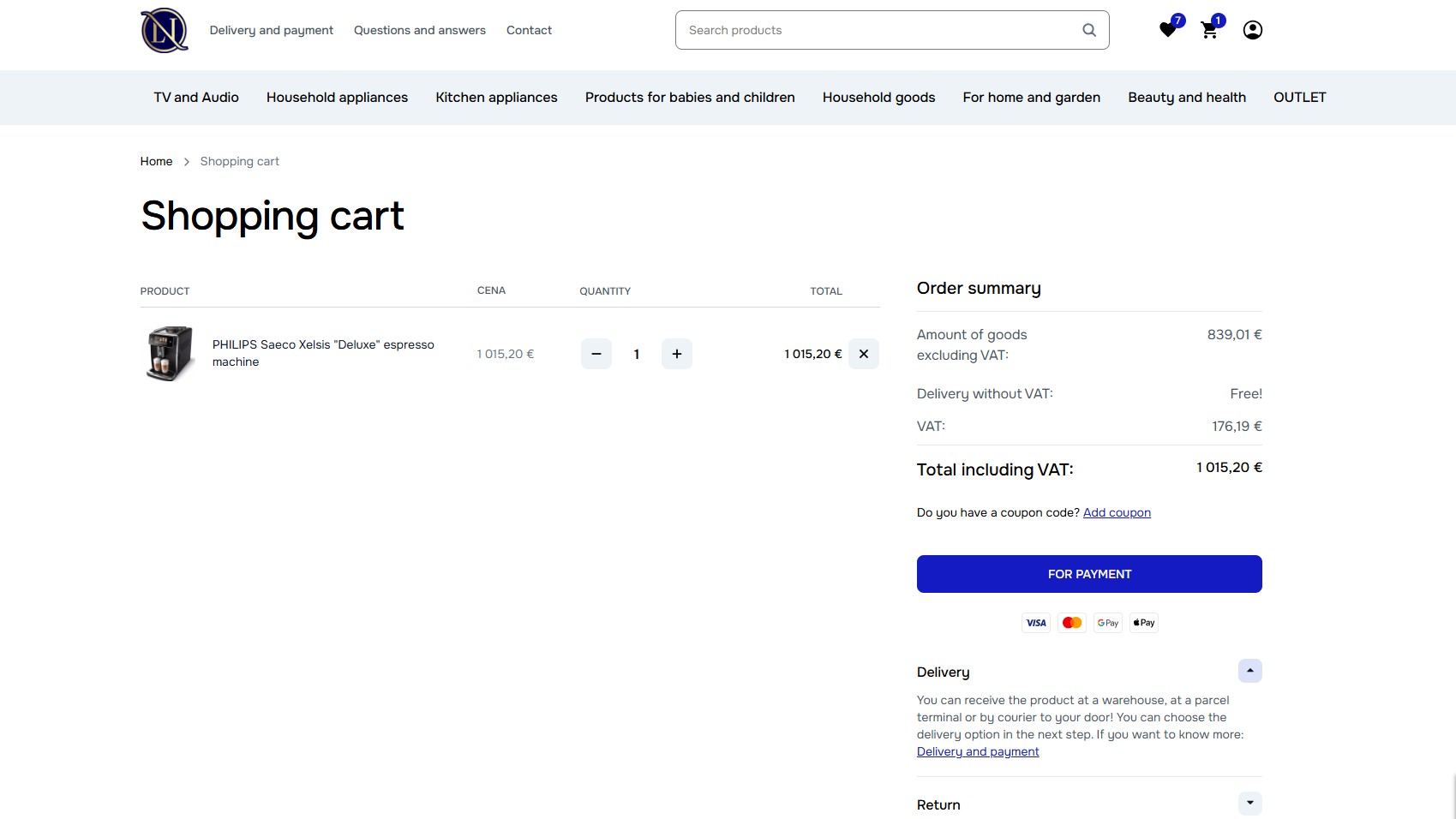
Pricing should be clear before users reach checkout. Showing estimated totals, delivery costs, or free shipping thresholds earlier in the journey helps set expectations and reduces friction.
2. Optimized Checkout Process
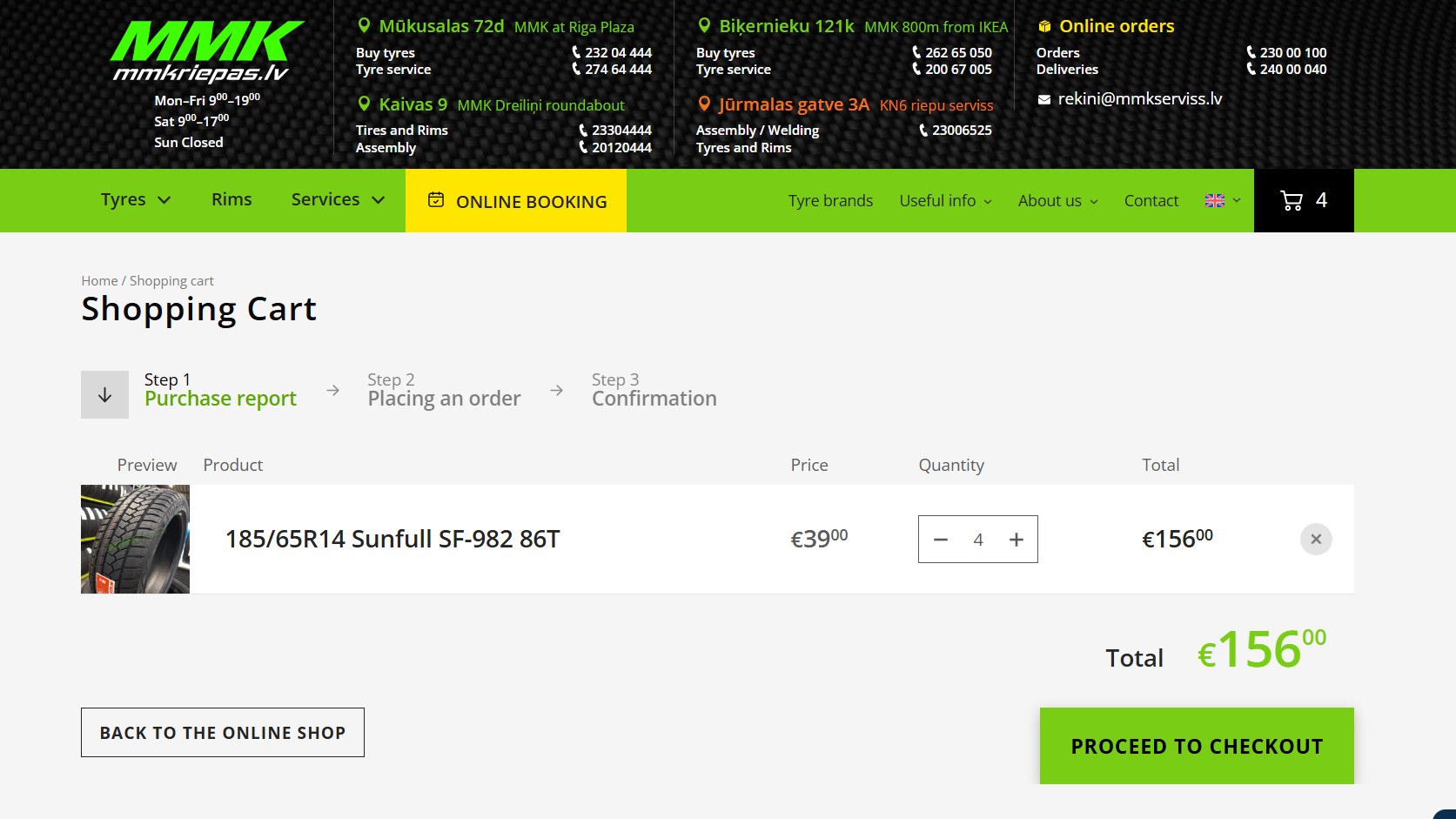
Checkout should be as short and straightforward as possible. Reduce unnecessary steps and only ask for the information needed to complete the order.
It also helps to show progress clearly, so users know where they are in the checkout process and how much is left before payment. This can be done with a simple step indicator at the top of the page (for example: Cart → Shipping → Payment → Review), or by breaking checkout into clearly labeled sections with visible next steps.
Pro Tip:
One common issue is forced account creation. Requiring users to register before buying can interrupt momentum. This should be avoided whenever possible. Instead, offer a guest checkout to keep the process moving. Users can still be invited to create an account after the order is complete.
3. Security And Trust Signals
Online shoppers are careful with where they enter personal details and payment information. A small moment of doubt about how their information will be handled can be enough for them to leave before completing the order.
Visible trust elements help reduce that hesitation. Display clear security badges, SSL indicators, accepted payment logos, and delivery timelines in the cart and checkout flow. Offer a money-back guarantee where appropriate, and use customer reviews or testimonials to show that other buyers have had a good experience.
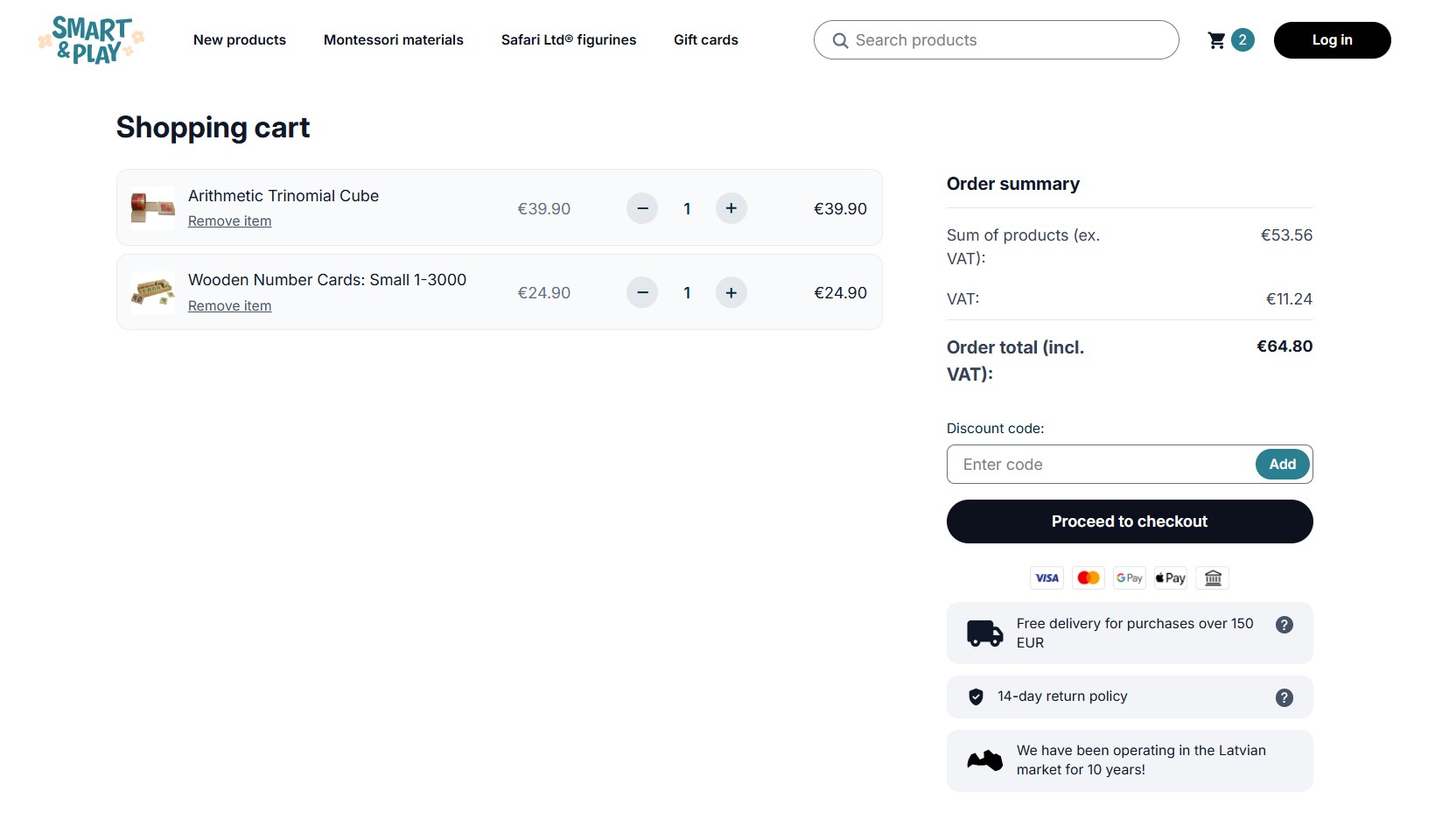
eComStrive has seen that placing these signals directly in the cart and checkout flow can reduce drop-offs. The key is consistency. Information shown during checkout should match what users saw earlier on the site.
4. Multiple Payment Options
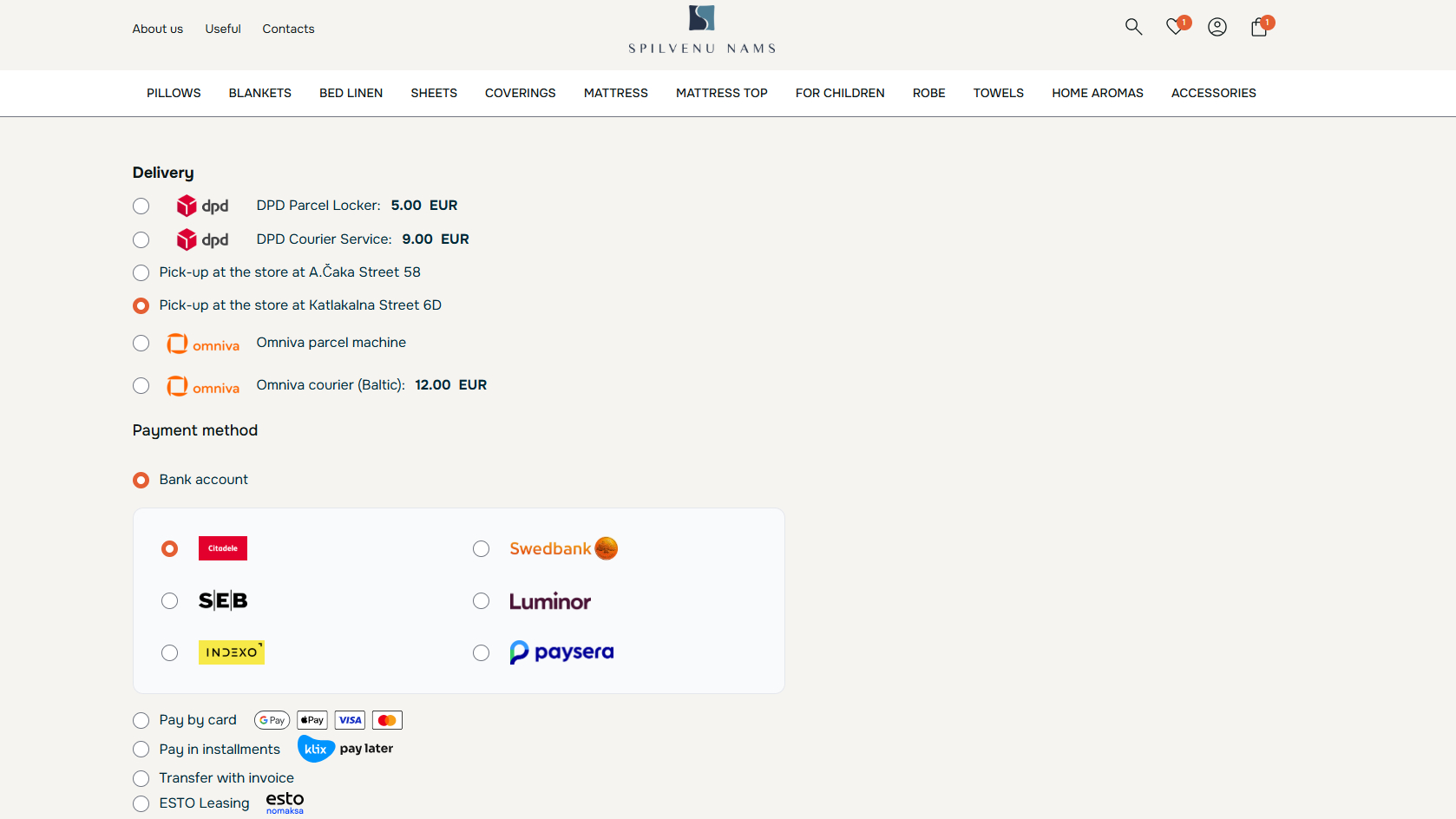
Limited payment options can cause users to leave even when they are ready to buy. If their preferred method is not available, completing the purchase becomes a hassle.
Offer the payment methods your customers already use, such as debit cards, credit cards, digital wallets, and payment gateways like PayPal and Stripe. This gives shoppers more flexibility and removes one more reason to abandon the cart.
5. Mobile Optimization
A large share of ecommerce traffic comes from mobile, so the cart and checkout experience need to be seamless on smaller screens. If forms are difficult to complete or pages load slowly, users are more likely to leave before paying. Small usability issues, like buttons that are hard to tap, can also create frustration that drives shoppers away.
Focus on clear buttons, short forms, fast-loading pages, and payment options like Apple Pay or Google Pay where possible.
For deeper improvements across the full buying journey, consider our Conversion Optimization services.

6. Live Customer Support
Make customer support easy to access during the buying flow. Place support options and visible contact details where questions are most likely to come up.
Live chat is one of the most impactful support options for reducing last-minute hesitation and is now considered by many to be a standard ecommerce feature. It can be integrated on product pages, cart pages, and checkout screens so users can get their questions answered immediately before going on to complete their purchases.
7. Retargeting Strategies
Use retargeting to bring shoppers back after they leave with items still in their cart. Targeted ads and follow-up emails can remind users what they were considering and give them a clear path back to the purchase.
Personalized messages usually work best. Mention the abandoned items, link directly back to the cart, and consider adding an incentive when it makes sense, such as free shipping or a limited discount.
8. Limited-time Offers
Limited-time offers work because they create pressure to decide. When a discount or promotion has an end point, users are less likely to delay the purchase.
Scarcity has a similar effect. If a product shows low stock or limited availability, it reduces the tendency to “come back later.” Instead of continuing to compare options, the user is more likely to complete the purchase to avoid missing out.
Pro Tip:
Used carefully, these signals can help move users past hesitation and into action. They should be honest and specific, not fake urgency or pressure tactics that make the brand feel less trustworthy.
9. Always Ask for Feedback
Customer feedback can help identify issues that analytics alone may not explain. Ask users why they did not complete a purchase through short surveys, follow-up emails, or on-site feedback forms.
When feedback is positive, display it where it can support the buying decision. Product reviews and testimonials help build trust, and they make it easier for shoppers to feel confident before completing their purchase.
Abandoned Cart Recovery Strategies
Cart abandonment prevention and cart recovery are two sides of the same problem. Prevention focuses on reducing drop-offs before they happen, while recovery focuses on bringing back shoppers who left items in their cart.
For a more detailed breakdown of recovery tactics, read our full guide to abandoned cart recovery.
Abandoned Cart Recovery: How to Recover Lost Ecommerce Sales
Shopping cart abandonment is a direct revenue problem for ecommerce stores. When shoppers add products to their cart but leave before buying,…
What Is Abandoned Cart Recovery?
Abandoned cart recovery is the process of re-engaging shoppers who added products to their cart but left before placing an order. Instead of treating those sessions as lost, recovery campaigns give customers a path back to the same purchase. This can include things like:
- Cart reminder emails
- Retargeting ads
- Personalized product reminders
- Personalized offers such as free shipping or discount codes
Top Abandoned Cart Recovery Channels
The main cart recovery channels are email, SMS, push notifications, exit-intent popups, and retargeting ads. Each one reaches shoppers at a different point after they leave or just before they exit.
Abandoned Cart Emails
Abandoned cart emails work when the shopper has entered their email before leaving the site. These emails remind them what they left behind and give them a direct link back to the cart.
They can also include a relevant incentive, such as free shipping or a discount, when that fits the margin and recovery strategy.
To see what actually works with abandoned cart emails, including content examples, read our full guide.
Abandoned Cart Emails: Examples, Templates, and Best Practices
Abandoned cart emails are one of the most useful ways to recover ecommerce sales because they speak to shoppers at a very…
SMS Recovery
SMS can be a strong recovery channel because text messages are opened at very high rates, often around 98%. The limitation is reach. You can only use SMS when the shopper has agreed to receive text messages.
For that reason, SMS usually works best alongside email rather than replacing it. Use it for higher-value carts or as a follow-up touch after the first abandoned cart email. Keep the message brief, mention the cart clearly, and include a direct link back to checkout.
Push Notifications
Push notifications can reach shoppers who have not provided an email address but have allowed alerts from your site or app. They are especially useful on mobile, where the reminder can appear directly on the user’s screen.
The main limitation is space. Push messages need to stay short, so they work best for simple cart reminders with a clear link back to the purchase. They are less useful for explaining product value or handling trust concerns.
Exit-Intent Popups
Exit-intent popups are used before the shopper leaves, so they are more of a prevention tactic than a recovery channel. They appear when a user shows signs of exiting the page, such as moving toward the close button or backing out on mobile.
These popups can offer free shipping, a small discount, or an option to save the cart for later. They will not stop every exit, but they can reduce cart loss before follow-up emails or retargeting campaigns are needed.
Abandoned Cart Retargeting
Abandoned cart retargeting uses tracking pixels to show ads to shoppers after they leave your site. For example, a user may add a product to their cart, leave without buying, and later see a reminder ad on platforms like Google or Facebook.
The main advantage is that retargeting does not depend on the shopper entering an email address. It keeps the abandoned product visible while the user continues browsing elsewhere, which can bring them back when they are ready to complete the purchase.
eComStrive Recommends – Prevent Cart Abandonment Before Recovery Starts
Recovery campaigns can help, but they should not be the predominant strategy. Emails, ads, and SMS can become expensive if the same issues keep causing users to leave.
A better long-term approach is to track where abandonment happens and why. EcomStrive recommends reviewing user behavior across the purchase journey so repeated drop-offs can be fixed at the source instead of handled only through recovery campaigns.
For a stronger ecommerce experience from product page to checkout, consider our Ecommerce Website Development services.

Cart Abandonment Tools And Software
If you need help tracking abandoned carts or understanding where shoppers leave, cart abandonment tools can give you that visibility.
These tools usually combine behavior tracking with recovery features. They show which carts were abandoned and help businesses follow up through channels like email, ads, SMS, or on-site prompts.
Common features include:
- Automated cart emails that remind users about abandoned items and include relevant product details
- Exit-intent popups that appear before a shopper leaves and offer a reason to stay
- SMS and push notifications that send short reminders through direct channels
- On-site support features such as live chat or checkout progress indicators that reduce friction before users leave
Reduce Cart Abandonment by Understanding Why It Happens
Cart abandonment is part of ecommerce, but it’s not a random phenomenon. Shoppers usually leave because something in the journey gives them a reason to pause, such as unclear pricing, weak product information, checkout friction, or a general lack of trust.
Reducing abandonment starts with a close look at user behavior analytics. Are they dropping off after shipping appears? Sitting too long on the payment page? Returning to product details because something is missing? Those patterns can reveal whether the issue is tied to pricing, product content, trust, or checkout usability.
Recovery campaigns can then serve as a backup for re-engaging customers who still leave. Email reminders, SMS, and retargeting can help bring shoppers back, but they work best when the main causes of abandonment are already being addressed.
If you need help finding where shoppers leave and what is causing it, eComStrive can help you turn user behavior data into practical improvements across your ecommerce site. Book a free consultation with us to get started!
Frequently Asked Questions
What is a good shopping cart abandonment rate?
A good shopping cart abandonment rate is lower than the average benchmark of 70.22%. The right target depends on your industry, device mix, and product type. For a more detailed comparison, read our full guide to cart abandonment rates.
Why do people abandon their online shopping carts?
People abandon online shopping carts mainly because something makes the purchase feel too expensive, inconvenient, or uncertain.
The most common reason is unexpected costs, such as shipping, taxes, or extra fees appearing late in checkout. Unexpected costs account for about 48% of cart abandonments. Forced account creation is another common reason, contributing to about 24% of lost sales because many shoppers do not want to register before buying.
How can I reduce shopping cart abandonment?
Start by making the checkout process easier to complete. Show costs early, support common payment methods, improve mobile usability, and avoid forcing users to create an account before purchase.
Recovery tactics can also help. Abandoned cart emails, SMS reminders, retargeting ads, and real-time support can bring shoppers back or answer questions before they leave.
