


Cart Abandonment Behavior Signals in Ecommerce
Before shoppers abandon a cart, they often leave a trail of hesitation. They may slow down, revisit details, adjust the cart, or hesitate at key decision points. These are cart abandonment behavior signals.
Cart abandonment behavior signals help ecommerce teams understand what shoppers do before they leave. That information is important because abandonment can come from very different causes. One shopper may be reacting to shipping costs, while another may be concerned about product quality.
Personalization works better when it responds to the behavior behind the abandoned cart. A shopper comparing products may need clearer proof, while a coupon-searching shopper may need a better-timed offer. Psychographic segmentation can sharpen that response by connecting behavior to motivations like price, quality, convenience, or trust.
Below, we’ll walk through common cart abandonment behavior signals in ecommerce, how to track them, and how to use those insights to reduce avoidable drop-offs.
- What Do Cart Abandonment Behavior Signals Mean?
- 12 Common Cart Abandonment Behavior Signals
- How to Track Cart Abandonment Behavior Signals
- How to Use Signals to Reduce Cart Abandonment
- Let Shopper Behavior Show You What to Fix Next
What Do Cart Abandonment Behavior Signals Mean?
Cart abandonment behavior signals are shopper actions that suggest a purchase may be at risk before the shopper actually leaves. They do not tell you exactly what the buyer is thinking, but they can reveal the psychology behind the hesitation.
That hesitation often builds through smaller moments where the shopper needs more reassurance, hits a friction point, or starts questioning the value of the purchase.
For ecommerce teams, the value comes from reading these behaviors in combination. When the same behaviors repeat across many abandoned sessions, they can point to a specific problem worth fixing. Those insights can feed into better cart recovery campaigns, more relevant product content, smarter personalization, and better-timed interventions.
12 Common Cart Abandonment Behavior Signals
In the main cart abandonment article, we introduced several common signals that can appear before a shopper leaves. This section looks at them in more detail.
But keep in mind, a single behavior does not prove abandonment risk. Insights should be gleaned from repeated patterns and combinations of signals.
Product Interest & Research Signals
This type of signal usually appears when shoppers are interested enough to keep evaluating, but not yet confident enough to buy. They are looking for evidence that the product fits their needs, justifies the price, and will not disappoint once it arrives.
1. Repeated Product Comparisons Before Checkout
When a shopper moves back and forth between product pages and the cart, they are often still trying to make a decision. They may compare two similar items, return to the cart, check another feature, and then repeat the same loop.
The shopper is still considering the purchase, but something about the choice is unresolved. They may be weighing:
- Price
- Features
- Materials or ingredients
- Sizing
- Delivery options
For categories like apparel, electronics, skincare, furniture, and beauty, this comparison stage can be especially important. If product differences are hard to understand, shoppers have to do more investigative work on their own, which is a drag on the user experience.
How to respond: Side-by-side comparisons, clearer specifications, review summaries, size guidance, and product badges can all help reduce that uncertainty.
2. Frequently reading FAQs, reviews, and product description
A shopper who spends a long time reading FAQs, reviews, and product descriptions is usually looking for confirmation. They may already like the product, but they still need a question answered or social proof before they continue.
That answer might be about quality, fit, durability, ingredients, delivery time, return policy, warranty, or whether the product will work for their specific need. This kind of research-heavy behavior often appears when the purchase feels slightly risky or expensive. If the shopper finds the reassurance they need, they may continue. If the information is vague, incomplete, or difficult to find, they may leave.
How to respond: Strong product descriptions, detailed FAQs, review highlights, user-generated images, and clear return information can help research-driven shoppers move forward.
3. Repeated Zooming on Product Images
Shoppers may zoom in repeatedly when they want to inspect quality, texture, finish, stitching, packaging, size, material, or color accuracy.
For example, a buyer may zoom in on a jacket to inspect the fabric, a beauty product to check texture, or a gadget to understand the ports and finish. They are trying to replace the physical inspection they would normally get in a store.
If the images do not answer the question, the consumer’s hesitation will grow. Low-resolution photos, missing angles, limited lifestyle shots, or inconsistent lighting can make the product (and your brand) feel hard to trust.
How to respond: Multiple angles, close-ups, real-use photos, scale references, videos, and user-generated images can all help shoppers feel more confident before they reach the cart.

4. Multi-Device Browsing During the Same Purchase Journey
Many shoppers discover products on one device and complete the purchase on another. A customer might find a product on mobile during a break, then revisit it later on desktop when they have more time to compare options or enter payment details.
- Mobile is often used for discovery and browsing.
- Desktop is often used for research, comparison, or final checkout.
Cross-device behavior is more likely to signal delayed decision-making than lost interest. The shopper may still want the product, but they are moving the decision into a more comfortable context.
How to respond: Ecommerce teams should employ saved carts, email reminders, account-based cart syncing, and cross-device remarketing. The easier it is for shoppers to resume where they left off, the less likely the purchase journey is to break between sessions.
Cart Uncertainty Signals
Cart uncertainty signals appear when the shopper is using the cart to think through the purchase.
5. Frequent Cart Editing and Quantity Changes
Repeatedly adding, removing, swapping, or changing quantities suggests that the shopper is recalculating the purchase. They may be trying to stay within a budget, compare bundle value, qualify for free shipping, or decide which items are necessary.
In many cases, it means they want the purchase to work but are still shaping the cart into something that feels acceptable.
How to respond: Clear pricing, visible discounts, free-shipping thresholds, bundle suggestions, and product recommendations can help here. When the cart makes totals, savings, and tradeoffs easier to understand, the shopper has less work to do before moving to checkout.
6. Returning to the Cart Multiple Times Without Progressing
When a shopper returns to the cart several times but does not move into checkout, the cart may be acting as a decision space. The shopper is reviewing the order or using the cart as a temporary holding area.
This can happen when pricing, delivery timing, return policies, or product details are not clear enough. It can also happen when the shopper is comparing the cart against another store.
How to respond: A cart page should answer the buyer’s remaining questions quickly. Total cost, delivery expectations, available payment options, return information, and trust signals should be visible before the shopper has to commit to checkout.
7. Removing and Re-Adding Products
When shoppers remove products after shipping, taxes, or discounts appear, they may be reacting to the final cost rather than the products themselves. The cart total has crossed a line where the order may not be justifiable.
This signal is slightly different from general cart editing. It shows up around pricing moments, after:
- A promo code fails
- Shipping is added
- A free-shipping threshold is missed
How to respond: Make discounts, shipping thresholds, and delivery costs easier to understand before the shopper reaches the final cart total. If many shoppers remove products at the same point, the issue may be price clarity.
Checkout Friction Signals
Checkout behavior signals appear when the shopper has moved into the checkout flow but something slows them down. At this stage, even small obstacles can have an outsized effect.
8. Sudden Drop-Off After Shipping Costs Are Revealed
A sudden exit after shipping costs appear is one of the clearest cart abandonment behavior signals. The shopper may have been comfortable with the product price, but the final total makes them second guess the purchase.
This is often a pricing transparency issue. Many buyers mentally commit to the product cost before seeing shipping, taxes, or handling fees. When the total rises late in the process, the store may lose a purchase it had nearly won.
How to respond: The fix is necessarily free shipping (although that’s often a winning option). Show delivery estimates, shipping thresholds, taxes, or total-cost ranges before checkout to reduce surprise. Clear messaging around delivery speed and return policies can also help shoppers understand what they are paying for with these additional costs.
9. Long Idle Time on the Checkout Page
A long pause on the checkout page can signal hesitation, but it is one of the more ambiguous cart abandonment behavior signals.
It does not always point to confusion or uncertainty, even though those issues run through many other abandonment signals. Sometimes the shopper simply needs time to think.
How to respond: Look for where the pause happens, then review what the shopper sees at that moment. Clear payment security cues, delivery details, return-policy reminders, and simple form design can help reduce last-minute uncertainty without adding more noise to the checkout experience.

10. Repeated Navigation Between Checkout Steps
When shoppers move backward and forward between checkout steps, they may be reviewing details, correcting mistakes, or trying to find information that was not clear the first time.
For example, a shopper may reach the payment step and realize the sidebar only shows the order total, not the selected delivery method or estimated arrival date. They go back to shipping to confirm whether they chose standard delivery, express delivery, or pickup.
This can point to:
- Unclear step labels
- Missing order summaries
- Delivery details that disappear too early
- Totals that change late in the flow
- Promotion rules that are hard to verify
- Payment or shipping options that need more explanation
What to do next: If your checkout does not use progress indicators, add them. Shoppers should always know where they are in the flow and how close they are to finishing the order. Additionally, ensure the information shoppers need at each step is easy to see and carried forward. Delivery method, arrival timing, order total, discounts, fees, and item details should not force shoppers to move backward just to confirm what they already entered.
Purchase Hesitation Signals
Purchase hesitation signals usually appear at the point where the shopper is closest to buying but still mentally wrestling with the decision.
11. Coupon-Code Searching Before Payment
A pause near the coupon-code field can mean the shopper has opened another tab to look for discounts. This is especially common when the checkout page displays a prominent coupon field, which can unintentionally remind shoppers that a better price might exist somewhere else.
Coupon searching is often part of the buying process for price-sensitive customers. If they find a discount, they may return and buy. If they do not, they may feel like they are overpaying and leave.
How to respond: Ecommerce teams can respond with strategies that make price-sensitive customers more likely to complete a purchase. Things like loyalty incentives, first-purchase offers, and automatic discounts are popular options.
12. Delaying the Purchase Despite Reaching the Final Step
Some shoppers will still walk away after reaching the final confirmation or payment step.
They may be asking last-minute questions like: Do I really need this? Is it worth the money? Should I wait, compare, or look for a better deal?
This signal is still valuable because the shopper is extremely close to converting. Even if they leave, they are one of the strongest audiences for recovery campaigns because the purchase intent is already proven.
What to do next: Use well-timed abandoned cart emails, SMS reminders, retargeting, saved cart links, or small reassurance cues to bring these shoppers back.
Individual signals can be easy to misread. The stronger story comes from patterns across abandoned sessions, which is why the next step is knowing how to track these behaviors clearly.
How to Track Cart Abandonment Behavior Signals
Cart abandonment signals can come from different types of data and different analysis methods. Funnel reports, session recordings, event tracking, and customer segmentation can all reveal different parts of the same story, including the larger patterns behind your abandoned carts.

1. Use Analytics to Track Checkout Funnel Behavior
Checkout funnel analysis breaks the path from cart to purchase into measurable steps.
Common stages include:
- Cart review
- Customer details
- Shipping method
- Payment details
- Order summary
- Order confirmation
This view helps teams see exactly where shoppers drop off. For example, if many users leave after shipping information, pricing transparency or delivery expectations may be the issue.
But in practice, many ecommerce businesses either lack complete funnel tracking or have event setups that miss important actions. When tracking is incomplete, it becomes much harder to detect abandonment signals accurately.
2. Analyze On-Site Behavior
On-site behavior analysis looks at how browsing sessions unfold. Instead of only counting events, it shows sequence, timing, and interaction patterns.
Session recording tools, such as Hotjar can reveal moments where the shopper starts circling instead of progressing:
- Revisiting the same pages and details
- Pausing on a page for longer than usual
- Scrolling up and down the page
- Comparing multiple products
- Returning to the cart again and again
This gives you useful friction data that standard analytics does not capture.
3. Track Key Interaction Events
Site-wide event tracking records the specific actions shoppers take across the store. These events may include:
- Product detail page views
- Cart additions
- Review interactions
- FAQ interactions
- Image zoom activity
- Coupon or promo-code field use
- Checkout initiation
- Payment errors or failed attempts
- Cart edits and item changes
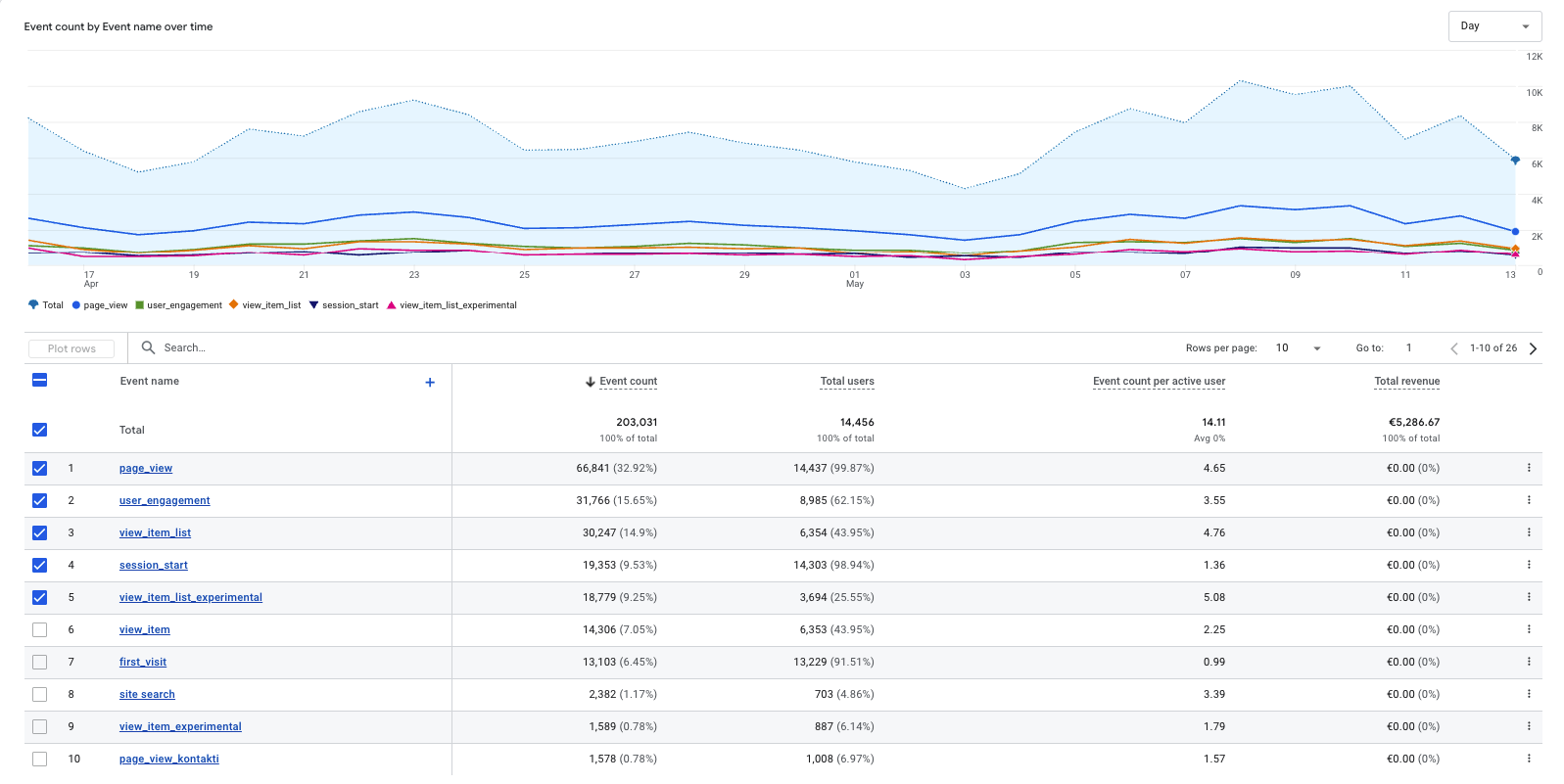
Each event adds detail to the buyer’s journey. When tracked consistently, these actions show how shoppers behave before they leave.
For example, you may find that many abandoners repeatedly open product details before exiting. That can point to a lack of clarity in your product descriptions or images – giving you a clear focus point for fixes.
4. Segment Your Data
Different groups of shoppers can abandon for different reasons, even when the final outcome looks identical in your reports. Separating behavior by segment provides useful information about where abandonment is coming from and what kind of response makes sense.
Useful segments include:
- Order value: Larger carts often create more second-guessing because the buyer has more money at stake. Smaller carts may be more affected by shipping fees, minimum order thresholds, or convenience.
- New vs. returning shoppers: First-time visitors and returning customers often have different trust levels and information needs.
In our experience, mobile users often show more irregular behavior, such as pauses, page switching, and back-and-forth navigation, but that does not always mean they lack purchase intent. It may simply mean the mobile experience is harder to use.
If your reporting does not show these behavioral patterns clearly, our Web Analytics service can help set up cleaner event tracking, funnel reporting, and ecommerce dashboards so abandonment signals are easier to identify and act on.

5. Focus on Patterns, Not Individual Actions
Cart abandonment signals are weak in isolation. One action rarely gives enough information to guide a decision. But they are incredibly useful when you look at them together. Combined signals can show the root cause for your cart abandonment issues such as pricing, trust, product clarity, checkout usability, or recovery timing.
That gives you a better basis for planning improvements. Instead of reacting to abandoned carts one by one, you can build a strategy around the friction points that appear again and again.
How to Use Signals to Reduce Cart Abandonment
Start by grouping similar behaviors together. Shoppers who compare products repeatedly may need stronger product content, whereas shoppers who pause at the coupon field may be price-sensitive.
From there, test specific fixes instead of guessing. Ecommerce brands can:
- Run A/B tests on product recommendations, review placement, shipping messages, checkout layouts, or recovery offers to see which changes improve completion rates.
- Build segmented email or SMS campaigns based on what the individual shopper did before leaving.
- Use psychographic data to match the message to the shopper’s motivation. For example, a review-heavy shopper may need proof, not a discount, so the follow-up could lead with verified reviews, customer photos, or a return-policy reminder.
Pro Tip:
In our experience, the majority of abandonment signals can be traced back to a small number of root causes: unclear pricing, lack of trust, or checkout complexity. Focus on fixing these first for the biggest impact.
For broader tactics, read our full guide on reducing cart abandonment. For post-exit strategies, explore our article on abandoned cart recovery.
Let Shopper Behavior Show You What to Fix Next
Cart abandonment behavior is more useful when you treat it as a diagnostic trail. The goal is not to assign one neat reason to every unfinished order, but to notice where shoppers start slowing down, what they return to, what they edit, and what information they seem to need before they feel ready to buy.
The best next step is to look for repeatable patterns. Find the friction points that show up most often, then use A/B tests, checkout changes, product content updates, and recovery campaigns as targeted fixes to move more shoppers from cart to purchase.
Frequently Asked Questions
What are cart abandonment behavior signals?
Cart abandonment behavior signals are the actions shoppers take before leaving a cart or checkout unfinished. They are not proof that someone will abandon, but they can show where hesitation is starting, especially when the same behaviors appear across many sessions.
What is the difference between cart abandonment signals and reasons?
Cart abandonment reasons explain the cause of the drop-off, while signals are the behaviors that point toward that cause. For example, high shipping costs may be the reason which is signaled by the shopper leaving right after the final delivery cost appears.
How can you identify cart abandonment signals on your website?
You can identify cart abandonment signals by tracking how shoppers move through product pages, carts, and checkout before they leave. Analytics, funnel reports, event tracking, heatmaps, and session recordings can show where actions repeat, which is what makes the data useful for improving the shopper’s experience.
