

Abandoned Cart Emails: Examples, Templates, and Best Practices
Abandoned cart emails are one of the most useful ways to recover ecommerce sales because they speak to shoppers at a very specific moment – after they’ve found something they want, but before they’ve committed to buying it. A strong abandoned cart email brings those products back into view while the purchase is still fresh, with a clear return path to checkout and enough reassurance to make the next step feel easy.
They are only one part of a broader abandoned cart recovery strategy, but they are often one of the easiest tactics to launch and optimize.
In this guide, we’ll break down how abandoned cart emails work, what to include, and how to build templates and sequences that help turn unfinished carts into completed orders.
- What Is an Abandoned Cart Email?
- The Business Case for Abandoned Cart Emails
- What Makes an Effective Abandoned Cart Email?
- Abandoned Cart Email Examples
- How to Structure an Abandoned Cart Email Sequence
- Abandoned Cart Email Strategy and Best Practices
- Abandoned Cart Email Tools and Software
- Keep the Abandoned Cart Email Focused on the Sale
What Is an Abandoned Cart Email?
An abandoned cart email is an automated message sent after a shopper adds products to their cart but leaves before placing the order. It gives them a simple way back to checkout and brings the abandoned products back into view while the shopper may still be open to buying.
You can send a single abandoned cart email, but many ecommerce stores use a short automated sequence instead. That gives you room to start with a simple reminder, then follow up with reassurance, product details, or an incentive if the shopper still has not returned.
How Abandoned Cart Emails Work
An abandoned cart email flow usually begins after a shopper adds a product to their cart and leaves before placing the order. Once your ecommerce platform records that activity, your email tool can send an automated message with a link back to the cart or checkout page.
Most abandoned cart emails include:
- A short reminder about the items the shopper left behind.
- Product images, names, pricing, or selected options, so the shopper does not have to rebuild the cart from memory.
- An incentive, such as a discount or free shipping, when behavioral signals suggest the shopper may need a stronger reason to come back and complete the order.
Why Abandoned Cart Emails Are Effective
Abandoned cart emails perform well because the message matches the shopper’s recent behavior. Instead of sending a broad promotion, you are following up on a specific action with specific products the customer already considered.
They also tend to perform better than standard email campaigns. Average open rates are often around 39-45% for a single abandoned cart email and 45-52% for a three-email sequence, which gives ecommerce brands another chance to reconnect before the sale is lost.
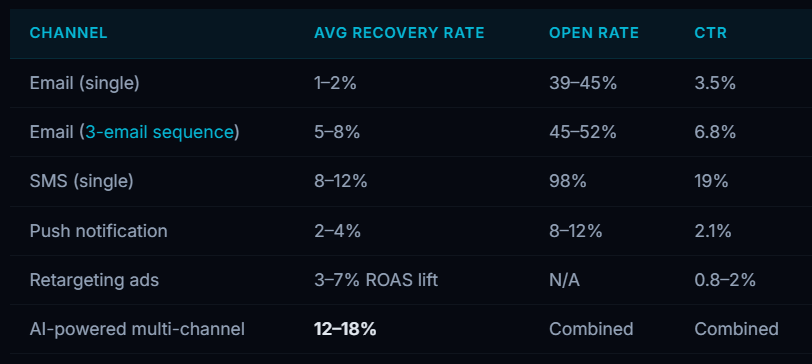
Personalization plays a big role in that performance. Abandoned cart emails can include the shopper’s name, the exact products they viewed, product images, selected options, and relevant offers based on cart value or behavior. That makes the message feel connected to the shopper’s session instead of coming across like a generic promotion.
After the automation is configured, abandoned cart emails can be sent shortly after a shopper leaves, while the product is still familiar and the buying decision is still fresh. This automated approach works for ecommerce operations at almost any scale. Compared with many other recovery tactics, they are also relatively low-cost to run.
In our experience, the best abandoned cart emails are simple and focused. The email should make the cart easy to recognize, make the next step easy to take. It should avoid trying to do too much at once. Overly complex layouts, excessive promotional messaging, or too many competing calls-to-action can distract users from what you actually want them to do – which is return to checkout.
For other ways to reduce lost sales and recover shoppers, read our guides on how to reduce cart abandonment and abandoned cart recovery.
The Business Case for Abandoned Cart Emails
Cart abandonment represents revenue that came close very to converting. These shoppers have signaled high-intent by moving past browsing. Abandoned cart emails give ecommerce brands a way to follow up without rebuilding that journey from scratch. They can bring products of interest back into view, answer common purchase concerns, and provide a frictionless path back to checkout.
A single email can recover some distracted shoppers, but a short sequence gives each message a clearer job, which often leads to stronger results. The first message can focus on the abandoned products. A later email can add reassurance, address delivery or return concerns, or introduce a carefully timed incentive.
There are multiple benefits to using automated abandoned cart emails:
- More recovered sales – Bring shoppers back before the cart becomes old news.
- Less manual work – Once the automation is running, the emails go out without someone chasing each abandoned order.
- Room for better offers – Use free shipping, a small discount, a bonus item, or a relevant cross-sell when the cart data supports it.
- Fewer dead ends – Send shoppers back to the products they picked instead of making them rebuild their cart. This keeps momentum intact.
- Better customer experience fosters customer loyalty – A useful reminder can feel helpful when it arrives at the right time and answers the right concern.
Pro Tip:
In our experience, businesses often underestimate how much revenue can be recovered with a simple abandoned cart email sequence. Even a basic setup can perform well when timing, messaging, and the checkout experience are working together.
What Makes an Effective Abandoned Cart Email?
An effective abandoned cart email has one main job: to convert an abandoned cart into a purchase. Everything else should support that goal. The message should be relevant, easy to scan, and focused on the next step. Secondary goals like building trust or adding upsells should never make the path back to checkout harder to see.
The strongest recovery emails usually combine multiple elements:
1. Clear and Relevant Subject Lines
The subject line sets the frame for the whole abandoned cart email. If it feels vague, loud, or disconnected from the cart, fewer shoppers will open it, which means fewer chances to recover the order.
Capture your audience’s attention with captivating subject lines. Use a combination of personalization and urgency. Thus, entice recipients to open the email and revisit their abandoned carts. Avoid generic subject lines and instead create curiosity and excitement.
For abandoned cart subject lines, focus on:
- Keeping it short – Aim for a subject line that will not get cut off on mobile. Around 50 characters or fewer is a safe target.
- Making it personal – Mention the shopper’s name, the product, or the cart when it makes the email feel more relevant.
- Use a natural tone – A line like “Want another look?” works better than a pushy command.
- Add urgency carefully – Use urgency only when it is true, such as low stock, an expiring cart, or a limited-time offer.
- Avoid spam signals – Skip all caps, extra punctuation, and anything that sounds like clickbait.
Here are a few examples:
- Still considering [Product Name]?
- [First Name], your [Product Name] is still available
- Ready to finish your order?
- Your cart total just changed
- Free shipping is waiting in your cart
- Low stock on something in your cart
Personalization helps the subject line feel less like a bulk reminder. Referencing the shopper’s saved item, product category, or cart status can make the message feel more attentive to their purchase, not just your recovery goal.
2. Strong Call-to-Action (CTA)
After reading the email, the shopper should know exactly where to click and what will happen next. Do not make them hunt for the CTA button or choose between several competing actions.
Use these CTA best practices:
- Keep it easy to tap – Make the CTA large enough for mobile users. A minimum tap area of 44 by 44 pixels is a good baseline.
Examples:
- Complete Your Order
- Claim Your Offer
- Return to Cart
- Continue Checkout
- Finish Checkout
- Apply Free Shipping
Well-designed CTAs can improve clicks because they reduce decision-making. Use one primary button, make the action clear, and send shoppers directly to the cart or checkout page connected to that email.
3. Product Reminders and Visuals
Show the shopper exactly what is still in their cart. Product visuals make the email easier to recognize quickly, especially if the shopper viewed several items or left the site in the middle of comparing options.
Useful details include:
- A clear product image
- The product name
- Selected options, such as size, color, or quantity.
- Current price, including sale pricing if relevant
- A short cart summary for multi-item orders
Product details make the email easier to act on. A shopper can see the item, confirm the variant, and understand the current cart value before deciding whether to return.
4. Trust and Reassurance
Many abandoned carts are related to unanswered questions which cause hesitation. The shopper is interested in the product, but still wants to know when it arrives, how returns work, whether the sizing is reliable, or if the store is legitimate and safe.
Social proof is useful here because it lets these hesitant shoppers check the product against someone else’s experience before they buy. A brand can explain the product, but reviews, ratings, and customer photos can answer the practical questions that often hold people back.
You can use different forms of social proof in abandoned cart emails, depending on what the shopper may need to feel confident buying:
- Reviews and ratings – Use product-specific feedback when possible, especially comments about fit, quality, durability, comfort, setup, or delivery.
- Customer photos – Show the product in real use so shoppers can see scale, texture, color, styling, or results outside of studio photography.
- Trust badges and guarantees – Add secure checkout badges, payment protection, warranties, money-back guarantees, or relevant certifications when the shopper may be unsure about buying from you.
- Delivery and return details – Make shipping timelines, return windows, exchanges, and store pickup options easy to find.
- FAQs – Answer the questions that commonly stop purchases, such as sizing, compatibility, materials, subscriptions, warranties, or assembly.
- Support options – Include a live chat link, email address, or customer support prompt for shoppers who need more answers before ordering.
Use social proofs that match your audience. If they may be unsure about fit, show sizing reviews. If the price may feel risky, make returns, warranty, or payment security easy to see.
When the reassurance feels specific to the product and the buying concern, you can make the shopper more comfortable returning to checkout.
5. Incentives and Offers
Incentives can help when the shopper’s hesitation is tied to cost or perceived value. Use them carefully, though. If every abandoned cart email leads with a discount, shoppers may learn to wait for the offer instead of buying at full price.
Effective incentives can include:
- Discounts – A small percentage or dollar amount off can help price-sensitive shoppers complete the order.
- Free shipping – This can work well when shipping cost is likely the reason the shopper stopped. It protects the product price while removing a common checkout objection.
- Limited-time offers – A deadline can encourage action when it is tied to a real promotion, cart expiration, seasonal sale, or inventory limit.
- Bonus items – A free sample, accessory, or add-on can increase perceived value without lowering the listed product price.
- Loyalty perks – Extra points, account credit, or member-only rewards can work well for returning customers who already have a relationship with the brand.
Put limits around your offers so recovery does not eat into profit. Segment by cart value, customer history, product margin, and previous engagement before deciding who gets a discount and when.
6. Avoid Overusing Discounts
Use discounts selectively. They work best when price is likely the real barrier and the cart value or margin can support the offer.
Segment incentives by:
- Purchase history – Returning or high-value customers may respond better to loyalty perks, early access, or spend-based rewards.
- Cart behavior – If shipping cost caused the drop-off, free shipping may work better than a discount.
- Engagement level – If the shopper seems unsure, reviews, return details, or FAQs may help more than a lower price.
- Cart value and margin – Save stronger offers for carts where the recovered revenue justifies the incentive.
The goal is to recover sales without giving away margin on orders that may have converted with a lighter touch.
7. Mobile-Friendly Design
Roughly 41% of emails are opened on mobile phones, which means a bulk of your abandoned cart emails will be as well. The mobile version cannot be an afterthought. A message that looks polished on a desktop can still lose sales if the product images load slowly, the button is hard to tap, or the layout forces shoppers to pinch and zoom.
Make the email easy to use on a small screen:
- Compress product images – Use images that load quickly and still make sense if the email client blocks them.
- Use a single-column layout – Stack the content vertically so shoppers can scroll naturally without horizontal movement.
- Keep the copy tight – Put the main message near the top, and keep subject lines and preview text short enough to avoid awkward cutoffs.
- Use readable text – Keep body copy large enough to read without zooming. A minimum of 16 pixels is a good baseline.
Most email tools offer responsive abandoned cart templates, but that does not mean the email is ready to send. Preview it on desktop and mobile, then test it on real iOS and Android devices across common email apps like Gmail, Apple Mail, and Outlook.
Pro Tip:
In our experience, simple abandoned cart emails work better than heavily designed promotional emails. The shopper already knows what they were considering, so the email should focus on a clean return path instead of adding more content to the process.
Abandoned Cart Email Examples
Shoppers leave carts for different reasons, so one abandoned cart email will not cover every situation. Use different abandoned cart emails examples based on signals such as:
- Customer type
- Cart value
- Checkout stage
- Product category
- Abandonment behavior
Below are common abandoned cart email examples and the situations where each one makes the most sense. You can use each example as a starting abandoned cart email template, then adjust the subject line, offer, CTA, and product details for your store.
Example 1: Simple Reminder Email
When to use:
Best for an early recovery attempt shortly after cart abandonment.
Why it works:
This email gives the shopper an easy way back without adding pressure. It reminds them what they picked, keeps the cart visible, and avoids jumping straight to a discount before you know one is needed.
It works well as the first email in a cart recovery sequence because many shoppers leave for ordinary reasons, such as distraction, timing, or comparison shopping. A simple reminder can bring them back without making the message feel overly promotional.
Example:
Subject line:
You left something in your cart
Email copy:
Hi [First Name],
It looks like you left a few items in your cart before completing your purchase.
Your cart is still waiting for you if you’d like to continue checkout.
CTA:
[Return to Cart]
Example 2: Trust-Building Recovery Email
When to use:
Best for hesitant shoppers or first-time customers who may need an extra nudge.
Why it works:
Some shoppers leave because they are not fully comfortable with the purchase yet. They may be unsure about delivery, returns, product quality, or whether the store is reliable enough to buy from.
A trust-building email gives them more to work with before they decide. Reviews, ratings, customer photos, secure checkout notes, return details, and support options can answer the doubts that a simple reminder does not cover. For first-time buyers especially, that added confidence can be what brings them back to complete the order.
Example:
Subject line:
Still thinking it over?
Email copy:
Complete your order with confidence:
- Secure checkout
- Fast delivery
- Easy returns
- Trusted customer support
Your selected items are still available.
CTA:
[Complete Your Purchase]
Example 3: Urgency-Based Email
When to use:
Best later in the recovery sequence, when previous emails have not led to a conversion.
Why it works:
Urgency gives the shopper a reason to make a decision sooner, especially when the cart includes products with limited stock, seasonal demand, or a time-sensitive offer.
This approach works best when the urgency is real. If an item is close to selling out or a promotion is ending, say so clearly. Avoid fake scarcity. Shoppers can usually tell when “last chance” language is being used too loosely, and that can hurt trust instead of helping the sale. When the urgency is authentic, it can create a real sense of FOMO that can drive more conversions.
Example:
Subject line:
Your cart may expire soon
Email copy:
The items in your cart are still available, but they may not stay in stock for long.
Complete your order today before your cart expires.
CTA:
[Finish Checkout]
Example 4: Discount Recovery Email
When to use:
Best for price-sensitive users or high-value carts.
Why it works:
A discount email can help when the cart total is the sticking point. A lower price, free shipping, or a limited-time code can make the order feel easier to justify, especially for shoppers who were comparing options or hesitating at the final cost.
Use this email with restraint. Save the offer for shoppers who show real price resistance or carts where the recovered revenue still protects your margin. The shopper should feel like they are getting a better deal and that they should act before the offer expires.
Example:
Subject line:
Complete your order and save 10%
Email copy:
Here’s a small incentive to help you complete your purchase.
Use code: SAVE10 at checkout.
CTA:
[Return to Cart]
Example 5: Personalized Recovery Email
When to use:
Best for returning customers or segmented audiences.
Why it works:
A personalized recovery email can feel more considered than a standard cart reminder. Instead of leaning on urgency or a broad discount, it uses what you know about the shopper, such as their saved item, past purchases, loyalty status, or product preferences.
This works especially well for returning customers. When the message feels tailored to their relationship with the brand, it can make the shopper feel recognized rather than pushed. That extra relevance can be enough to bring them back to the order.
Example:
Subject line:
[First Name], your selected items are waiting
Email copy:
We noticed you were checking out:
[Product Name]
[Product Name]
Complete your order anytime – your cart is still saved.
CTA:
[Continue Checkout]
How to Structure an Abandoned Cart Email Sequence
One abandoned cart email can work when the shopper only needs a nudge. A short sequence gives you more flexibility. Across 2-3 emails, you can start with a reminder, A good sequence should give each email a purpose. The goal is to create more chances to recover the cart without sending the same reminder over and over.
A well-structured abandoned cart email sequence can help you:
- Reach shoppers while the cart is still recent
- Address the reason they may have paused
- Build buyer confidence through reviews, delivery details, or return information
- Save urgency or incentives for later messages
- Improve recovery without making the sequence feel repetitive
Timing affects how well your sequence will perform.
Example Abandoned Cart Email Sequence
Email 1: Reminder Email
Send the first email while the cart is still recent, usually within the first few hours after abandonment. Keep this message simple. The shopper may simply have been interrupted, distracted, or is still deciding.
If that first message does not recover the cart, give the shopper roughly 24 hours before the next email. That gap keeps the sequence from feeling pushy while still following up before the purchase has gone cold.
Recommended focus for the first email:
- Abandoned products
- Simple messaging
- Clear CTA
- Frictionless checkout return
This first email should make returning to the cart feel easy, not turn the message into an aggressive sales pitch.
Email 2: Trust and Reassurance Email
Send the second email about 24 hours after the first if the shopper still has not purchased. Use this message to handle the practical questions that often stop checkout, such as delivery time, return rules, product quality, sizing, or support.
Recommended focus for the second email:
- Delivery timelines or shipping options
- Return and exchange details
- Product-specific reviews
- Star ratings or customer photos
- Sizing, fit, setup, or compatibility notes
- Links to customer support or live chat
This message is most useful when the abandoned cart suggests a bigger decision, such as a first purchase or a higher order value.
Email 3: Urgency or Incentive Email
Use the third email as the final message in the standard sequence. At this point, you can introduce a stronger reason to return, such as a limited-time discount, free shipping, or a genuine low-stock warning.
Recommended focus for the third email:
- A clear deadline for the offer
- Low-stock or cart-expiration messaging when accurate
- A discount, free shipping, or bonus item if margin allows
- Direct subject lines, such as “Your discount ends tonight” or “Low stock on [Product Name]”
- One primary CTA back to checkout
This email should not feel like another version of the first reminder. It should give shoppers a specific reason to act now, especially if they still seem interested but have not completed the order.
Pro Tip:
In our experience, the strongest sequences build gradually. Start with the cart, follow with reassurance, and save urgency or incentives for the end when they have a clearer job to do.
Abandoned Cart Email Strategy and Best Practices
A strong abandoned cart strategy gets more precise over time. Most brands start with a basic reminder sequence, then refine it by studying how shoppers respond after each email and what still prevents them from completing the order.
Long-term performance depends on how well you:
- Segment shoppers by behavior, cart value, and customer history
- Personalize emails around the actual cart and buying context
- Test timing, subject lines, CTAs, and offers
- Adjust the sequence based on what shoppers do after each email
- Improve the pages and checkout steps shoppers return to
The best practices below help turn a basic reminder sequence into a more controlled recovery system, where timing, segmentation, testing, and checkout experience all support the same goal.
Segment Users Based on Behavior
Segmentation helps you respond directly to the possible friction points that led to the abandoned cart. Use cart data, customer history, and checkout behavior to decide what kind of message the shopper should receive, instead of forcing every abandoned cart into the same recovery email.
Segmentation can be based on:
- New vs. returning customers – Trust-building for new shoppers; loyalty perks for returning ones.
- Cart value – Stronger incentives for higher-value carts when the margin supports it.
- Device type – Shorter copy and larger CTAs for mobile shoppers.
- Browsing behavior – Product details or reviews for shoppers who viewed the same item repeatedly.
- Purchase history – Recommendations based on past orders or saved preferences.
- Product category – Different reassurance for apparel, electronics, beauty, furniture, or subscriptions.
Better segmentation usually means better recovery economics. You can avoid giving discounts to shoppers who may have returned with a reminder, reserve stronger offers for carts with higher revenue potential, and send trust-building messages where hesitation is more likely to block the sale.
Use A/B Testing to Improve Performance
A/B testing shows which parts of your abandoned cart emails are actually helping shoppers return and which parts are getting ignored. Test one meaningful change at a time so you can see what affects opens, clicks, recovered revenue, or unsubscribes.
Common testing areas include:
- Subject lines
- Preview text
- CTA wording
- Email length
- Product image size
- Offer type
- Discount amount
- Send timing
- Personalization details
A/B testing should be an ongoing process. What worked in the past can lose impact as your audience, product mix, pricing, traffic sources, or seasonality changes.
Balance Recovery Frequency Carefully
Too many recovery emails can make the sequence feel pushy. Keep the flow short, space messages carefully, and make sure each email adds something new.
A balanced sequence should:
- Stay relevant to the abandoned cart
- Avoid repeating the same message
- Stop after the shopper buys or opts out
- Save discounts for later emails or specific segments
The goal is to recover the order without making the shopper feel chased.
Combine Email with Other Recovery Channels
Email is usually the center of an abandoned cart strategy, but it does not have to work alone. A multi-channel approach can keep the cart visible in different places, as long as shoppers have opted in where required and the messaging does not become excessive.
Other recovery channels can include:
- SMS reminders – Use SMS for short, time-sensitive messages, especially for final reminders or limited-time offers. Only send these to shoppers who have clearly opted in.
- Mobile push notifications – Send app users a direct prompt with a link back to checkout. This can work for shoppers who are already logged in and have push notifications enabled.
Abandoned Cart Recovery: How to Recover Lost Ecommerce Sales
Shopping cart abandonment is a direct revenue problem for ecommerce stores. When shoppers add products to their cart but leave before buying,…
Monitor Analytics and Recovery Performance
Track abandoned cart email performance regularly so you can see where the sequence is working and where it is not. Open rates and clicks are useful, but they only tell part of the story. The value of analytics is using those patterns to make steady improvements to your timing, offers, messaging, and return path to checkout.
Useful recovery metrics include:
- Open rates
- Click-through rates
- Recovered revenue
- Conversion rates
- Unsubscribe rates
- Revenue per recipient
- Device-specific performance
- Time from email click to purchase
Look at what happens after the click, too. If shoppers open the email and return to the site but still do not buy, the issue may be with the checkout page, shipping costs, product details, or mobile experience rather than the email itself.
Use that data to refine subject lines, send times, offer rules, message content, and the checkout path. For deeper support, explore our Conversion Optimization (CRO) services.

Stay GDPR-Compliant
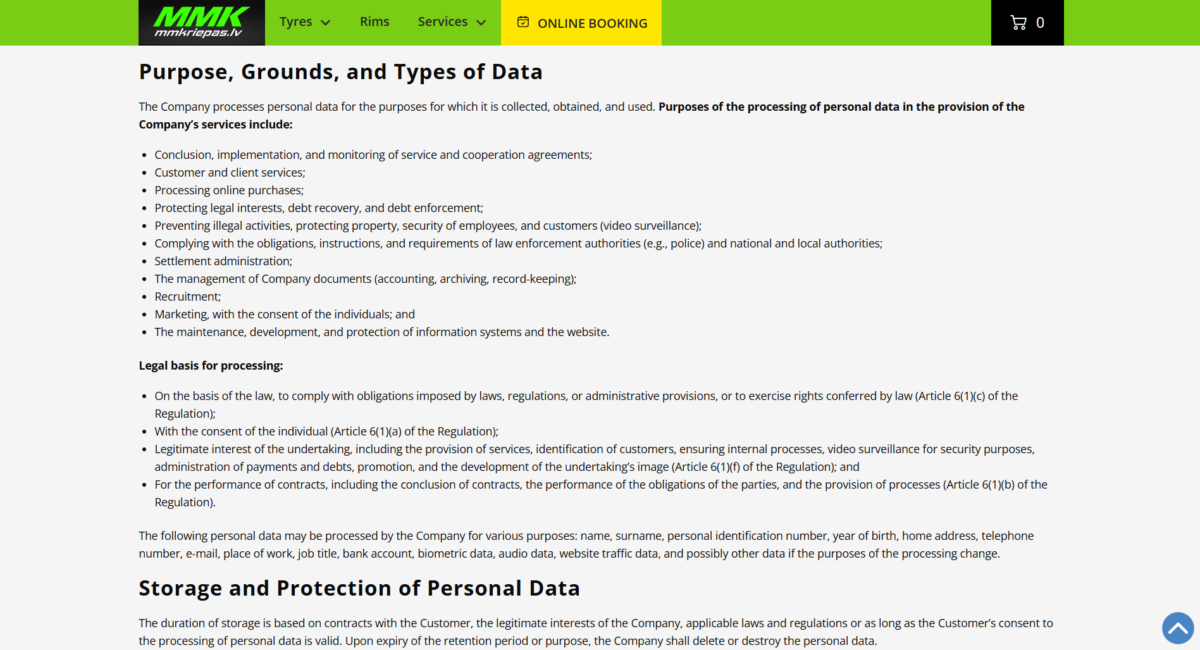
Abandoned cart emails still need to follow email marketing and privacy rules. The exact requirements depend on where your shoppers are located, but the basics stay the same: be clear about how you use customer data, get the right consent, and make it easy for people to opt out.
A few compliance basics to cover:
- Use clear opt-ins – Do not rely on pre-checked boxes. Let shoppers actively agree to receive marketing emails where consent is required.
- Separate marketing from transactional emails – Order confirmations and shipping updates are not the same as abandoned cart promotions, so treat them differently.
- Honor unsubscribes – If someone opts out of marketing, remove them from abandoned cart sequences too.
- Keep consent records – Track when and how shoppers agreed to receive emails.
- Review your privacy policy – Make sure it explains your email marketing practices and how shoppers can opt out.
- Use compliant email tools – Choose platforms with built-in consent, unsubscribe, and suppression-list features.
Regional rules can vary. In the EU, GDPR and the ePrivacy Directive generally require clear consent for marketing emails. In the U.S., CAN-SPAM focuses on accurate sender details, non-deceptive subject lines, a physical address, and a clear unsubscribe option. In Canada, CASL has stricter consent requirements, including express consent or certain forms of implied consent.
Getting compliance wrong can lead to fines, deliverability problems, blocked email domains, and the kind of brand damage that costs more than the recovered cart was worth.
Compliance also affects trust. A recovery email should feel relevant and respectful, not like a brand is using cart data in a way the shopper did not expect.
Abandoned Cart Email Tools and Software
Abandoned cart emails depend on good timing and clean customer data. A general newsletter tool can send campaigns, but cart recovery usually needs automation that can react to shopper behavior as it happens. The right software can connect cart activity, purchase history, product data, and email engagement in one place, making recovery campaigns easier to scale without adding more manual work for your team.
Useful abandoned cart software features include:
- Automated workflows – Send follow-up emails based on cart activity without manual work.
- Dynamic cart content – Show saved products, updated prices, product recommendations, or availability details.
- Behavioral triggers – Start, pause, or adjust emails based on actions like cart creation, checkout abandonment, purchase completion, or product views.
- Audience segmentation – Adjust messages based on customer history, cart value, product category, or behavior.
- Personalization tools – Use shopper and cart data to customize subject lines, product blocks, offers, and send logic.
- A/B testing – Test subject lines, CTA wording, layouts, timing, and incentives.
- Performance tracking – Monitor opens, clicks, recovered revenue, conversion rates, and offer performance.
- Ecommerce integrations – Connect with Shopify, WooCommerce, Magento, BigCommerce, or a custom store setup.
- Real-time data syncing – Keep cart, inventory, and customer data current across your ecommerce and email platforms.
Some advanced tools also support AI-assisted recommendations, predictive purchase scoring, or automated recovery logic based on shopper behavior.
As always, the best tool is the one that fits your store’s platform, data setup, and recovery goals.
Popular Ecommerce Email Platforms
The best abandoned cart email platform depends on how your store is built, how much automation you need, and how much control your team wants over segmentation, personalization, and reporting. Budget also matters, especially if pricing changes based on contact volume, order volume, or advanced automation features.
Many ecommerce businesses use tools such as:
These platforms vary in how deeply they support automation, segmentation, analytics, and ecommerce integrations. Some are built mainly for straightforward email flows, while others offer more advanced customer data, multi-channel recovery, and compatibility with platforms like Shopify, Magento, WooCommerce, and custom ecommerce stores.
WooCommerce Abandoned Cart Email Solutions
WooCommerce does not include abandoned cart recovery by default, so stores usually need a plugin or a connected email platform to track abandoned carts and send recovery messages. The benefit is flexibility of the platform is flexibility. WooCommerce works with many cart recovery tools, so you can choose the setup that fits your store instead of being locked into one built-in system.
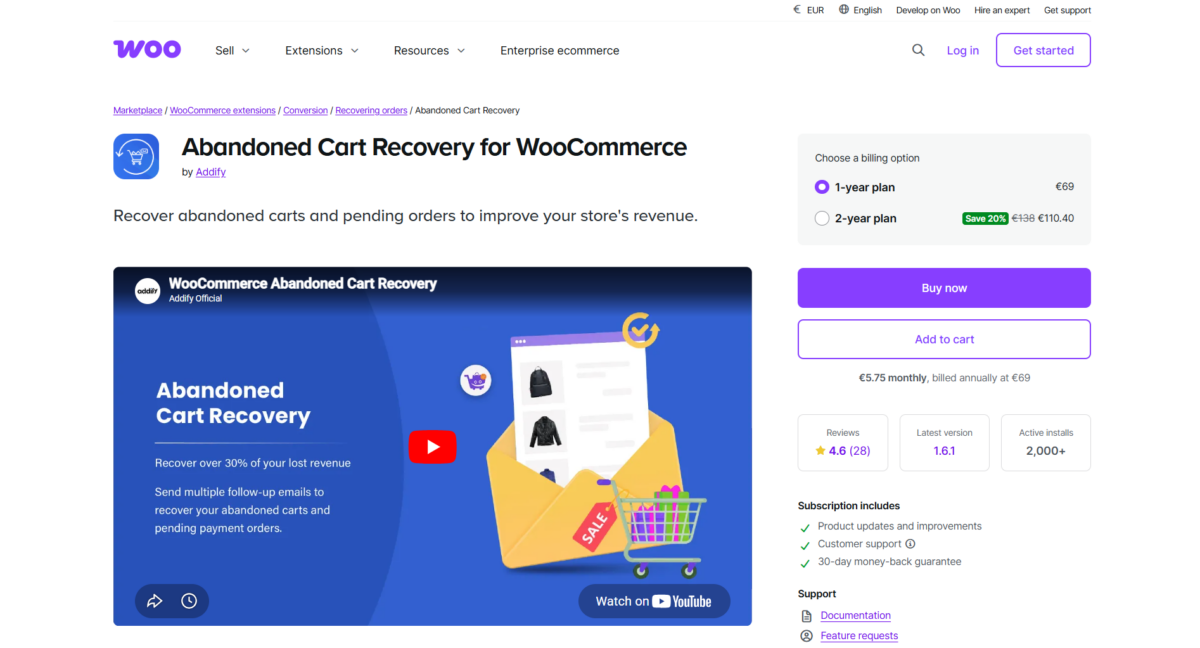
Popular WooCommerce abandoned cart options include tools such as CartFlows, AutomateWoo, Abandoned Cart Lite, WooCommerce Recover Abandoned Cart, and many ecommerce email platforms that integrate with WooCommerce. Depending on the tool, you may get automated email sequences, cart recovery links, customer segmentation, discount rules, and basic recovery analytics.
If your abandoned cart recovery depends on custom checkout behavior, plugin compatibility, or a more complex WooCommerce setup, eComStrive’s Ecommerce Development services can help you choose, configure, and optimize the right recovery approach.

What to Consider when Choosing Software
Before choosing abandoned cart software, look at how the tool will fit into your store’s actual recovery process. The best option is not always the one with the longest feature list. It is the one your team can use consistently and connect cleanly with the rest of your ecommerce setup.
Key things to evaluate include:
- Platform fit – Make sure the tool works with your ecommerce platform, CRM, email setup, analytics tools, and checkout structure.
- Multi-step sequences – Look for control over several recovery emails, not just one automatic reminder.
- Timing control – You should be able to decide when each email is sent, whether that is 30 minutes, several hours, or a full day after abandonment.
- Cart value rules – A $20 cart and a $500 cart should not always receive the same message or offer.
- Segmentation options – The tool should let you adjust flows by product type, customer history, cart value, or shopper behavior.
- Email builder – Your team should be able to create branded recovery emails without needing a developer for every edit.
- Reporting – Look for clear data on recovered revenue, recovery rate, click performance, offer performance, and revenue by email.
- Compliance features – Consent tracking, unsubscribe management, and suppression lists are important for GDPR, CAN-SPAM, CASL, and other email rules.
- SMS or multi-channel support – If SMS, push, or retargeting are part of your recovery strategy, check whether the tool can support those channels without creating a mess.
In our experience, software works best when it supports a strong buying journey rather than trying to patch over a weak one. Even advanced recovery tools cannot fully make up for confusing product pages, slow mobile checkout, unclear delivery costs, or weak trust signals.
Keep the Abandoned Cart Email Focused on the Sale
Abandoned cart emails are most effective when they are simple, personalized, and uncluttered. The shopper should see what they left behind, understand why the email is relevant, and have a clear way back to checkout.
The strongest approach is usually a short, controlled sequence rather than one overloaded message. Start with a simple reminder, then use later emails to answer doubts or introduce an offer when the cart value supports it. Keep the design clean, the CTA obvious, and the return path easy on mobile.
From there, improvement comes from the data. Track recovered revenue, clicks, unsubscribes, timing, and post-click behavior. Then use those findings to adjust the sequence, reduce friction, and recover more sales without relying on discounts for every abandoned cart.
Frequently Asked Questions
What is an abandoned cart email?
An abandoned cart email is an automated follow-up message that brings shoppers back after they leave products sitting in their cart. It usually shows the saved items and links directly back to the cart or checkout page.
Why are abandoned cart emails important for eCommerce?
Abandoned cart emails are important because they help ecommerce stores recover revenue from orders that were started but never completed. They give shoppers an easy way back to checkout while giving the brand another chance to address timing, cost, trust, or other purchase concerns.
How many abandoned cart emails should you send?
Most ecommerce stores should send 2–3 abandoned cart emails as part of a short recovery sequence. The first email can be a simple reminder, while later messages can add reassurance, urgency, or an offer when the shopper still has not purchased.
The right number depends on:
– Customer behavior
– Product type
– Purchase complexity
– Brand positioning
What should an abandoned cart email include?
An abandoned cart email should include the saved products and a clear CTA that takes the shopper back to checkout. It should make the order easy to recognize and easy to resume.
Effective abandoned cart emails often include:
– Product details
– Product images
– A clear CTA
– Relevant personalization
– Trust signals
– Mobile-friendly formatting
What is a good abandoned cart email conversion rate?
A good abandoned cart email conversion rate depends on the store, audience, product price, and recovery strategy. Instead of relying on one universal benchmark, compare performance against your own abandoned cart emails over time.
Conversion rates can vary based on:
– Industry
– Product type
– Pricing
– Audience quality
– Email timing
– Incentive strategy
