
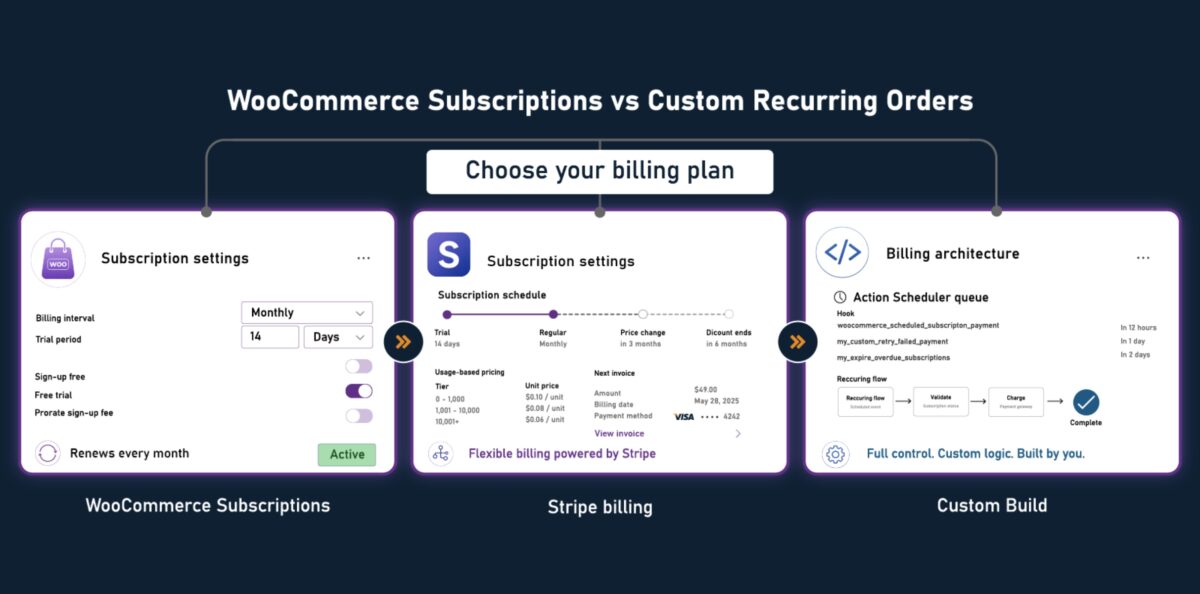

WooCommerce Recurring Orders Without WooCommerce Subscriptions: When to Build Custom
You installed WooCommerce Subscriptions. It handled the basics. Fixed-interval billing worked, renewal emails arrived on time, and customers could manage their own plans from the account page.
Then the edge cases arrived. A corporate client wanted per-seat pricing with quarterly billing. A product needed usage-based billing with monthly true-ups. A B2B account needed invoice-first net-30 terms. Each requirement was technically supported by an extension. Each extension introduced new edge cases. You now have five interdependent plugins in the billing stack, renewal failures that only manifest for specific configurations, and a developer who is not sure which plugin owns the problem.
At some point the question changes. It stops being “which extension handles this?” and starts being “is WooCommerce Subscriptions the right foundation for how this business bills?”
This is a decision guide, not a pitch for custom work. After reading it, you will be able to make a defensible case for or against a custom recurring order system using a framework that accounts for billing model complexity, subscriber volume, and plugin maintenance cost.
You probably do not need custom recurring billing if you have one subscription product, fixed monthly billing, and fewer than 200 active subscribers.
You should investigate custom billing if renewals require manual adjustment each cycle, billing bugs only affect certain plan types, or your team cannot explain which plugin controls the renewal flow.
- What WooCommerce Subscriptions Can and Cannot Do
- The Four Levels of Custom Recurring Order Work
- When Stripe Billing Is the Right Middle Path
- 5 Signs Your Billing Requirements Have Outgrown WooCommerce Subscriptions
- When to Stay on WooCommerce Subscriptions and When Custom Is Premature
- The Business Case for Custom Recurring Order Development
- Building Custom Recurring Billing In-House or Hiring an Agency
- What Custom WooCommerce Recurring Order Development Actually Includes
- Decision Framework: Subscriptions Plugin, Extensions, Custom Plugin, or Full Custom System?
- How to Choose a WooCommerce Recurring Order Development Company
- The Decision
What WooCommerce Subscriptions Can and Cannot Do
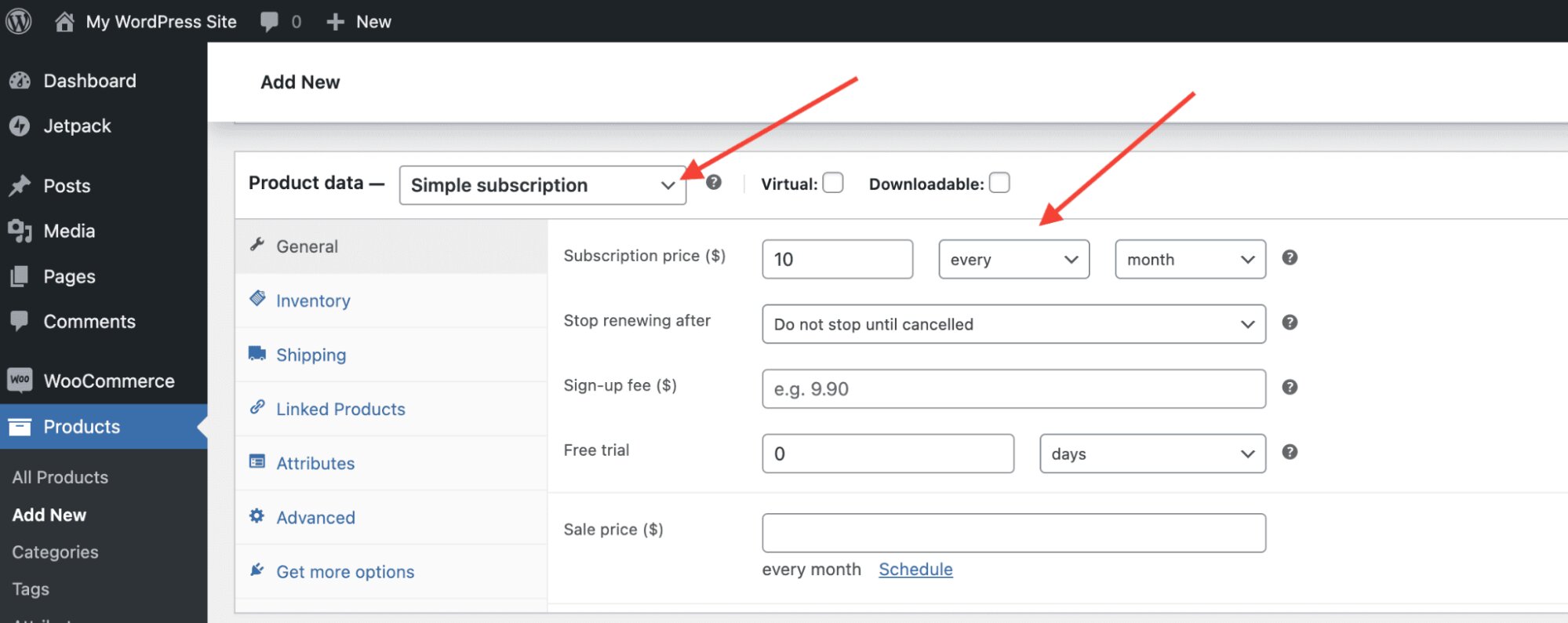
WooCommerce Subscriptions handles fixed-interval recurring billing well. For stores with a single subscription product billed weekly, monthly, or annually, the plugin covers most requirements: automatic renewals, subscriber account management, failed payment handling, and gateway integrations via the Subscriptions add-on network.
WooCommerce Subscriptions was built to solve one problem cleanly: recurring charges at regular intervals. Everything beyond that is addressed through extensions that were not designed to work together. The more billing complexity you add, the more you are managing a collection of billing plugins rather than a billing system.
The specific areas where Subscriptions reaches its limits:
- Usage-based or metered billing. If the amount charged varies by consumption, seat count, or any metric that changes month to month, Subscriptions have no native mechanism. Extensions approximate this with manual adjustment fields, but they require admin intervention each cycle and do not scale.
- Event-triggered billing. WooCommerce Subscriptions does not natively turn arbitrary business events into billable recurring charges without custom logic. Upgrades, seat additions, or project milestones that should create a charge require custom code or a gateway-level workaround.
- B2B billing models. Purchase-order-based billing, invoice-first net-30 accounts, and per-seat pricing are not native to WooCommerce Subscriptions. B2B ecommerce development that includes recurring billing almost always requires custom work beyond what the plugin can provide.
- Complex pause and resume logic. The plugin supports pause and resume within its own billing cycle model only. Pause logic tied to project phases or conditional reactivation triggers does not fit the plugin’s state machine.
| What WooCommerce Subscriptions Handles | Where It Breaks Down |
| Fixed weekly, monthly, or annual billing | Usage-based or metered billing |
| Automatic renewal emails and receipts | Event-triggered charges outside billing cycle |
| Subscriber account self-management | Per-seat pricing with mid-cycle adjustments |
| Failed payment retry sequences | Invoice-first net-30 B2B billing |
| Upgrade and downgrade between plans | Pause logic tied to external project or account states |
| Extension integrations for major gateways | Multi-gateway billing with fallback routing |
The Four Levels of Custom Recurring Order Work
Agencies use “custom recurring billing” to describe everything from a single billing cycle tweak to a fully custom order engine built on Action Scheduler with direct gateway API integration. These are not the same decisions. Conflating them is how scoping conversations produce wildly different quotes for what sounds like the same requirement.
Level 1: WooCommerce Subscriptions Out of the Box
Plugin plus default gateway integration, no extensions, no custom code. Works for a single billing model with fixed intervals and no account-specific requirements. See the current annual license cost.
Level 2: WooCommerce Subscriptions Plus Extensions
One to three add-ons for specific requirements such as variable billing, all-products compatibility, or additional gateway support. Works when each extension addresses a clearly bounded requirement from vetted sources with active maintenance. Typical additional cost: $100 to $600 per year.
Level 3: Custom Plugin Extending WooCommerce Subscriptions
A custom plugin built to WordPress coding standards using WordPress hooks and filters that handles requirements Subscriptions cannot address natively: usage-based adjustments, event-triggered billing, account-specific pause logic. Typical cost: $4,000 to $12,000. Maintenance: ongoing attention on WooCommerce major releases.
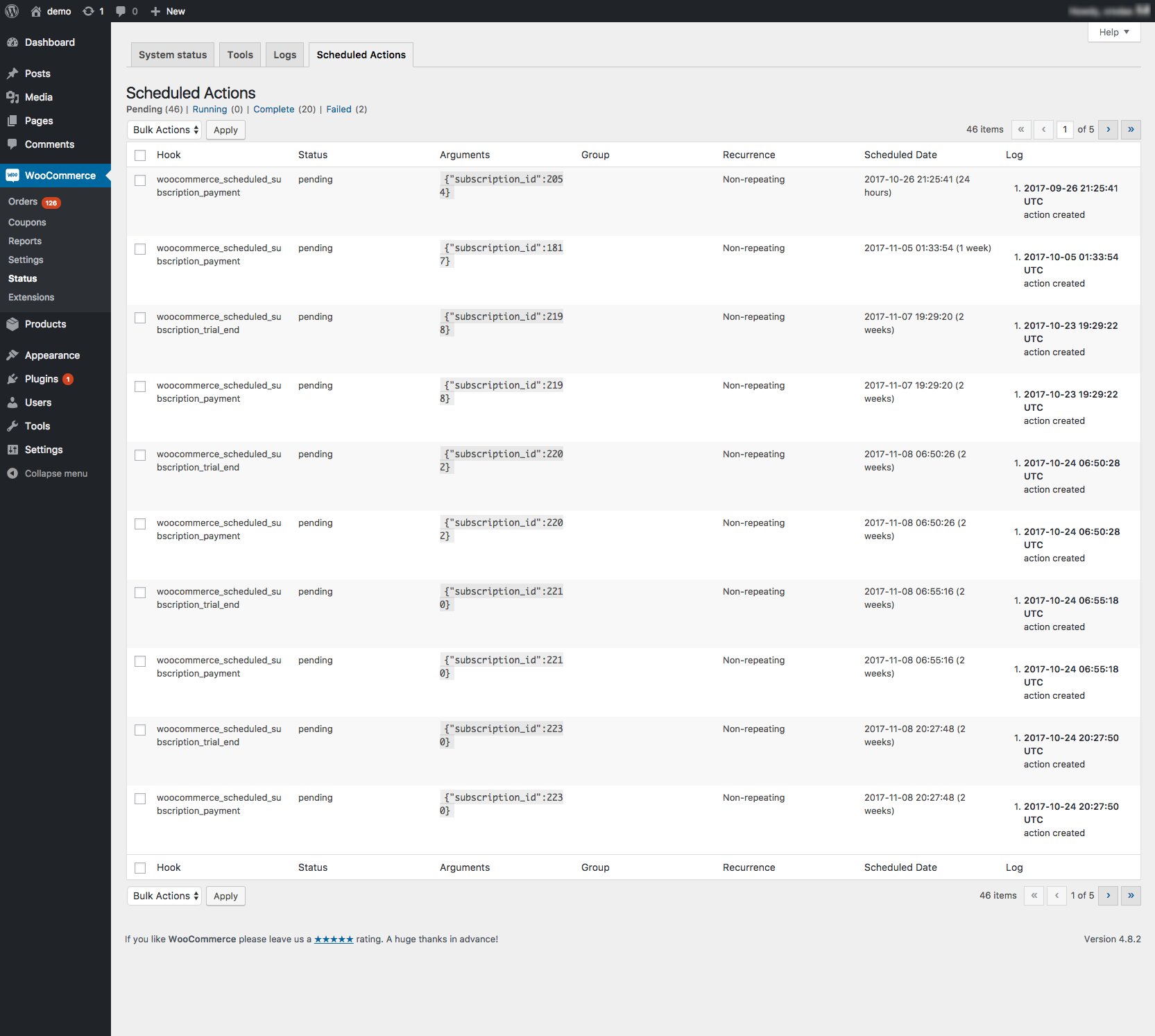
The scheduling layer for any custom recurring system is Action Scheduler, the same library WooCommerce Subscriptions uses internally. A minimal illustrative entry point looks like this:
// Illustrative only, a production build handles idempotency, payment token
// retrieval, gateway retry logic, subscriber state transitions, and logging.
// Register a recurring billing action for a custom subscription
as_schedule_recurring_action(
    strtotime( 'tomorrow midnight' ),      // First run timestamp
    DAY_IN_SECONDS * 30,                   // Interval in seconds (30 days)
    'yourplugin_process_renewal',          // Hook your plugin listens for
    [ 'subscription_id' => 1042, 'customer_id' => 87 ]
);
// Handler that fires on each scheduled recurrence
add_action( 'yourplugin_process_renewal', function( $subscription_id, $customer_id ) {
    $order = wc_create_order( [ 'customer_id' => $customer_id ] );
    // Add line items, attempt charge via gateway API, update subscription state
}, 10, 2 );
The point is not the code itself. It is that as_schedule_recurring_action() and wc_create_order() are the same building blocks WooCommerce Subscriptions uses internally, which means the infrastructure gap between plugin and custom is smaller than it appears from the outside.
Level 4: Fully Custom Recurring Order System
Subscriptions replaced. Recurring logic built on Action Scheduler with direct integration to the gateway via the WooCommerce REST API or a gateway SDK. Full control over billing models, retry logic, dunning, and subscriber state. Typical cost: $18,000 to $50,000. Maintenance: high, bespoke code.
| Level | What Changes | Typical Cost | Timeline | Maintenance |
| Subscriptions out of the box | Nothing custom, plugin handles billing | Current license fee | Days | Low, plugin updates only |
| Subscriptions plus extensions | Bounded requirements met by add-ons | $300 to $800/year | 1 to 3 weeks | Medium, multiple update cycles |
| Custom plugin extending Subscriptions | Business-specific rules on top of Subscriptions | $4,000 to $12,000 | 4 to 8 weeks | Medium, dependent on Subscriptions cycle |
| Fully custom recurring system | Billing engine independent of Subscriptions | $18,000 to $50,000 | 3 to 6 months | High, fully bespoke |
The right question is not “do we need custom recurring billing?” It is: at which level does the actual constraint sit?
When Stripe Billing Is the Right Middle Path
Before reaching for a fully custom billing engine, technical teams should evaluate one more option: Stripe Billing handling subscription logic while WooCommerce handles the storefront, order records, fulfillment, and account management.
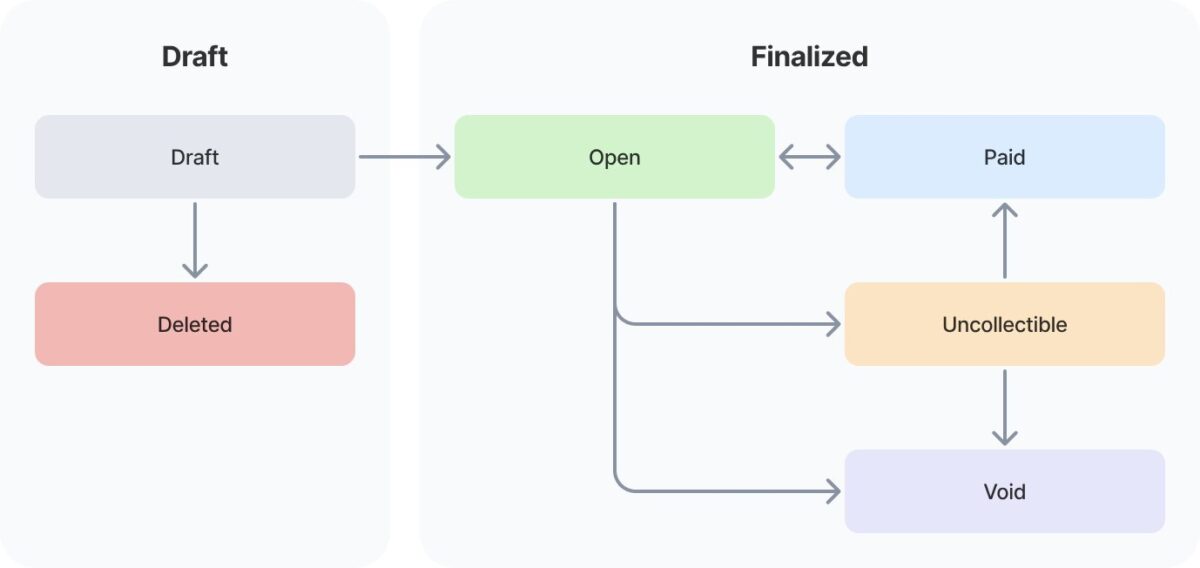
This architecture makes sense in three situations. First, when billing complexity exceeds what WooCommerce Subscriptions can model but the business wants billing managed at the infrastructure level rather than the WordPress plugin level. Second, when the billing model changes frequently: usage tiers, per-seat pricing, proration, trial periods. Stripe Billing has native support for these without WooCommerce extension dependencies. Third, when the team already uses Stripe and needs recurring billing that syncs back to WooCommerce for order history, fulfillment triggers, and customer account visibility.
The tradeoff is integration surface area. Stripe Billing requires a sync layer between Stripe subscription events and WooCommerce order records. Without it, renewal orders, failed payment handling, and customer account data fall out of sync. eComStrive builds this integration layer as part of custom recurring order development when the billing complexity warrants it.
5 Signs Your Billing Requirements Have Outgrown WooCommerce Subscriptions
Signal 1: Billing errors that only occur in specific billing configurations. Your standard monthly plan renews correctly. The quarterly plan with a mid-cycle seat change fails silently for some accounts. Billing-model-specific failures almost always trace to extension interaction, not Subscriptions itself. That interaction will not become more stable as the billing model grows. The warning sign is not one failed renewal. It is the support ticket that says, “This only happens for quarterly accounts with seat changes,” and nobody knows where to look first.
Signal 2: Your billing model does not fit fixed-interval architecture. You are approximating usage-based billing through manual admin adjustments or offline invoice corrections. Every billing cycle requires a manual audit before renewals fire. The warning sign is not the first manual audit. It is the sixth in a row, and the person running it has started keeping a private spreadsheet because the plugin has no way to show what actually changed since last month.
Signal 3: Customer account management is creating support overhead. Customers cannot pause, modify, or upgrade their billing in ways that match how the product actually works. At 200 subscribers this is manageable; at 1,000, it is a staffing problem. The warning sign is not a customer who asks to pause their plan. It is billing renewal day already blocked on the ops team calendar, and two hours of manual handling that the account portal cannot absorb.
A store running WooCommerce Subscriptions plus three billing extensions spends approximately $600 to $1,200 per year in extension fees, plus one to two developer days per quarter managing conflicts. Over three years, that is $1,800 to $3,600 in fees and $5,400 to $10,800 in developer time, approaching the cost of a targeted custom plugin that handles the same requirements permanently.
Signal 4: You are running three or more billing-related extensions with active interdependencies. Each was added to solve a specific problem. Now they share state in a sequence nobody fully documented. High-Performance Order Storage adoption can reveal legacy plugin incompatibility here and may require a full compatibility audit before the store can move forward. The warning sign is not a plugin conflict. It is the developer message that says, “I need a staging environment and two days before I can tell you whether this WooCommerce update is safe to run”, and that message arrives every quarter.
Signal 5: B2B accounts require billing logic the plugin cannot model. Purchase-order-based billing, net-30 accounts, or per-seat pricing with account-level management cannot be addressed by extending WooCommerce Subscriptions without significant custom code. The warning sign is not a B2B client asking for a purchase order. It is the account manager who has quietly started invoicing that client through a separate system because the plugin has no path to that workflow, and nobody has flagged it yet.
| Signal | What It Looks Like | Subscriptions Handles | Requires Custom Work |
| Billing errors in edge cases | Failures for specific configurations only | Fixed-interval renewals | Mixed models, seat changes, mid-cycle adjustments |
| Billing model mismatch | Manual audit every billing cycle | Fixed intervals | Usage-based, metered, event-triggered billing |
| Account management gaps | Support handling self-serve requests | Basic pause, upgrade, downgrade | Per-seat management, project-phase pausing, B2B logic |
| Extension instability (3 or more) | Conflicts on major WooCommerce updates | One or two vetted extensions | Three or more interdependent billing extensions |
| B2B billing requirements | PO billing, net-30, account-level invoicing | None natively | Invoice-first billing, multi-user account rollup |
If three or more of these signals describe your billing setup, the billing architecture decision is worth thinking through carefully before committing to a build. A scoping conversation, not a sales call, is the fastest way to map your specific constraints to the right path. Book a scoping conversation with eComStrive.
When to Stay on WooCommerce Subscriptions and When Custom Is Premature
This section deserves real weight. Most stores reading this article are not ready for custom recurring billing.
Most billing problems that feel like an architecture problem are actually an extension selection problem. Before replacing WooCommerce Subscriptions, audit which extensions are actually required. Stores that trim from five extensions to two and pick the right two often find that the instability disappears without a custom build.
If your billing model is genuinely simple, custom billing is overhead you do not need. A single product at a fixed monthly price is exactly what WooCommerce Subscriptions was built for. Custom infrastructure here creates maintenance cost without a corresponding business benefit.
If subscriber volume is low, billing errors are easier to handle manually than to engineer away. Under 100 active subscribers, imperfect recurring billing is operationally manageable. A custom billing system does not close at this scale unless the billing model is inherently incompatible with the plugin.
If the subscription model is still being validated, lock in the architecture after it is proven. Investing in conversion optimization for the signup flow typically produces faster returns at this stage than rebuilding billing infrastructure.
Custom recurring billing built at the wrong stage locks the business into an architecture it may need to change within eighteen months. WooCommerce Subscriptions supports iteration. A custom billing system does not.
Stores that should wait: under 200 active subscribers, a single fixed-interval billing model, and no specific measurable operational failure tied to the plugin layer.
The Business Case for Custom Recurring Order Development
Billing error cost. A 2% billing failure rate on 500 subscribers at $80 per month produces 10 failed renewals per cycle. If half do not recover through the default retry sequence, that is $400 per month in lost revenue, or $4,800 per year. Custom dunning logic with direct gateway integration can recover additional failed renewals when the failure causes are known and the retry flow is designed around them.
Extension debt arithmetic. WooCommerce Subscriptions plus three billing extensions at $150 each costs $649 per year. Add one developer day per quarter at $450 per day: annual total reaches $2,449. Over three years: $7,347. A custom plugin replacing that extension layer typically costs $6,000 to $12,000 and removes the quarterly compatibility overhead.
| Active Subscribers | Monthly Billing Failure Rate | Monthly Revenue at Risk | Annual Revenue at Risk |
| 200 subscribers at $80/month | 2% (4 failures) | $160 to $320 | $1,920 to $3,840 |
| 500 subscribers at $80/month | 2% (10 failures) | $400 to $800 | $4,800 to $9,600 |
| 1,000 subscribers at $80/month | 2% (20 failures) | $800 to $1,600 | $9,600 to $19,200 |
| 2,000 subscribers at $80/month | 2% (40 failures) | $1,600 to $3,200 | $19,200 to $38,400 |
Range reflects partial recovery through default retry sequences. Upper figure assumes no automated recovery.
Customer lifetime value protection. At a 24-month subscriber lifetime, each lost subscriber at $80 per month represents $1,920 in lost LTV. Custom billing that improves involuntary churn recovery by 1 percentage point across 1,000 subscribers preserves $19,200 in LTV per year.
Building Custom Recurring Billing In-House or Hiring an Agency
The build-vs-hire question is separate from the plugin-vs-custom question. Deciding that your billing architecture needs custom development does not automatically mean you need to hire. It depends on what your internal team can actually own, not just build, but maintain.
When an internal developer can handle it
A custom billing plugin is within reach for a WooCommerce developer who already understands Action Scheduler, WordPress hooks and filters, and has worked with at least one payment gateway API. If your requirement is bounded, a specific dunning sequence, a usage-based adjustment field, a custom pause-and-resume flow, a scoped plugin build of this type does not require agency involvement. The condition is that the same developer who builds it is still available when WooCommerce releases a major update six months later.
When to hire
Three situations consistently push billing work beyond what in-house teams can absorb cleanly.
First, when the billing model is complex enough that the architecture decision itself takes longer than the build, usage-based billing with gateway-level metering, mid-cycle proration, or B2B account-level rollups are not self-evident to implement correctly the first time. Second, when your internal developer is the same person running the store, billing infrastructure maintained as a side task accumulates risk faster than almost any other codebase. Third, when a migration from WooCommerce Subscriptions is involved: subscriber state, stored payment methods, and active plan continuity all have failure modes that are expensive to discover in production.
When attempting it in-house is a mistake
If no one on the current team has worked directly with Action Scheduler or a gateway’s stored credentials and retry APIs, a custom billing build should not be a learning project. Billing failures caused by incorrect retry logic or misconfigured webhook handling compound silently, a developer learning the gateway API on a live subscriber base is a specific kind of risk that is difficult to recover from. The cost of a failed migration or a broken dunning sequence at 500 active subscribers exceeds the cost of agency involvement by a significant margin.
The honest version of the in-house vs hire question is not “can someone on our team build this?” It is “can someone on our team build, test, migrate, and maintain this while also keeping the rest of the store running?” Those are different answers for most teams.
What Custom WooCommerce Recurring Order Development Actually Includes
eComStrive, a WooCommerce development agency, offers custom WooCommerce development services for recurring orders that typically cover: billing requirements scoping through the website discovery process; custom billing engine architecture on Action Scheduler or direct gateway integration; subscriber account management UI aligned to how the product bills; dunning sequence design and failed payment recovery; migration from WooCommerce Subscriptions including subscriber state and active plan continuity; and an ongoing maintenance model.
What is not automatically included unless explicitly scoped: gateway certification for custom billing flows, tax calculation for variable billing amounts, and legacy subscriber data cleanup. A good agency defines scope boundaries before development begins.
For brands evaluating whether WooCommerce is the right platform for their subscription model, ecommerce website development services cover the broader platform decision. Running a technical SEO audit before any migration protects earned rankings through the transition.
Decision Framework: Subscriptions Plugin, Extensions, Custom Plugin, or Full Custom System?
If you are unsure which row in this table fits your situation, a website strategy session can clarify the right path before any development is scoped.
| Billing Stage | Key Symptoms | Recommended Approach | Why It Fits | Risk If Ignored |
| Simple billing, early stage (under 200 subscribers, single fixed-interval model) | One billing model. No operational failure. Extensions are stable. | WooCommerce Subscriptions out of the box, or with one vetted extension. | Build cost not recoverable at this volume. | None significant. Custom billing too early locks architecture to an unproven model. |
| Growing complexity (200 to 1,000 subscribers, 2 to 3 billing models) | Billing errors in specific configurations. Manual adjustments each cycle. Support handling self-serve requests. | Custom plugin extending WooCommerce Subscriptions for the specific failing requirement. | Solves the bottleneck without replacing stable billing infrastructure. | Errors compound with growth. Manual corrections become a staffing problem. |
| Multiple billing models, operational failures (1,000 or more subscribers, 3 or more billing models) | Model-specific billing failures. Three or more interdependent extensions. Account management gaps creating measurable support costs. | Custom billing plugin on Action Scheduler, replacing the extension layer. Direct gateway integration for dunning. | A 2% failure rate on 1,000 subscribers at $80/month is $800 to $1,600 per month in at-risk revenue, before involuntary churn losses. | Billing failures scale with subscriber volume. Support overhead becomes a growth constraint. |
| B2B or complex account billing | PO-based billing, net-30 accounts, per-seat pricing, multi-user account rollup. | Fully custom recurring order system. Direct gateway integration. Custom account management UI. | B2B billing cannot be addressed by extending Subscriptions without significant custom code. | B2B accounts require manual intervention every cycle. Revenue capped by billing constraints. |
| Any stage, wrong problem diagnosis | Low subscriber volume. Simple billing model. Instability from extension conflicts, not Subscriptions itself. | Audit and trim the extension layer first. Do not commission custom work yet. | Most billing instability comes from extension conflicts, not the plugin. | Custom billing budget spent on a problem extension cleanup would have been solved. |
How to Choose a WooCommerce Recurring Order Development Company
Ask directly: when would you recommend a store that stays on WooCommerce Subscriptions? An agency that answers with specific criteria based on billing complexity and subscriber volume is demonstrating the judgment you want in a billing infrastructure partner.
Ask how they handle gateway certification for custom billing flows. Direct gateway integration requires compliance with the gateway’s stored credentials, retry, and refund policies. Treating this as a configuration step creates compliance risk downstream.
Ask what the scoping process covers for a billing migration. A structured website discovery process should map every active billing configuration and current subscriber state before development begins. If the discovery skips subscriber data, the migration will break active accounts.
A flat-rate quote on a custom billing system before billing requirements are fully documented is a signal to keep looking. Billing migrations have a long tail of edge cases that only surface during requirements review. An agency that prices it before mapping it is pricing something it has not yet understood.
Frequently Asked Questions
Can WooCommerce Handle Recurring Orders Without “WooCommerce Subscriptions”?
Yes. WooCommerce can handle recurring orders without WooCommerce Subscriptions using Action Scheduler for billing cycle management and direct gateway API integration for charge execution. This requires custom development but supports billing models the plugin cannot handle natively: usage-based billing, event-triggered charges, and complex B2B account billing.
What Are the Limitations of WooCommerce Subscriptions?
WooCommerce Subscriptions has no native support for usage-based billing, event-triggered charges, invoice-first net-30 B2B billing, or per-seat pricing with mid-cycle adjustments. Extensions can approximate some of these, but each adds maintenance overhead cost and conflict potential when WooCommerce releases major updates.
When Should You Build Custom Recurring Billing Instead of Using WooCommerce Subscriptions?
When billing errors occur in specific plan configurations, three or more billing extensions are interdependent, the billing model requires usage-based or event-triggered charges, or B2B account billing cannot be addressed by extending the plugin. A useful threshold: if manual intervention is required every billing cycle, the architecture is working against the business.
How Do You Handle Failed Payments in a Custom WooCommerce Recurring Order System?
Custom billing systems can implement a fully configurable dunning sequence: retry timing and frequency, gateway-level logic for specific failure codes, and fallback handling for cards that cannot be retried. WooCommerce Subscriptions has a plugin-level retry system, but custom development is needed when retry behavior must vary by plan, failure code, customer segment, or external account state.
Does WooCommerce Subscriptions Support Usage-Based Billing?
No. Extensions can approximate it through a variable billing field with manual adjustments before each renewal, but this requires admin intervention each cycle and does not scale. True usage-based billing requires custom development with direct gateway integration.
What Does Custom Recurring Order Development Include for WooCommerce?
Billing requirements scoping and subscriber state mapping; a custom billing engine using Action Scheduler and direct gateway integration; subscriber account management aligned to how the product bills; dunning and failed payment recovery logic; migration from WooCommerce Subscriptions if applicable; and an ongoing maintenance model.
Is WooCommerce Subscriptions Worth It for a Small Subscription Business?
Yes, for most. At its current annual license cost, WooCommerce Subscriptions handles fixed-interval billing, renewal management, and subscriber account tools well for a single straightforward billing model. The investment in custom billing is not recoverable at low subscriber volumes unless the billing model is inherently incompatible with the plugin.
How Do You Migrate From WooCommerce Subscriptions to a Custom Recurring Billing System?
Map every active billing configuration and subscriber state, replicate that state in the new billing engine without disrupting active subscriptions, re-tokenize stored payment methods if the gateway changes, establish new retry sequences, and test the full billing lifecycle in staging before switching production. Skipping the subscriber state audit is the most common cause of post-migration account failures.
If you are not sure whether this is a plugin problem, a gateway problem, or a billing architecture problem, map the current renewal flow before rebuilding anything. Most stores that end up commissioning a custom build say in retrospect that the problem was visible in the renewal logs twelve months earlier, they just did not know what they were looking at. A single diagnostic session with someone who has seen the pattern before is cheaper than finding out during a migration.
The Decision
Most billing problems that require custom development are visible six to twelve months before the business acts on them. The extension conflicts accumulate. The support queue fills with billing adjustment requests. The developer says it is possible but the estimate keeps growing.
If this guide confirms your billing architecture has outgrown WooCommerce Subscriptions, the next step is a scoping conversation where a WooCommerce specialist can map your billing configurations and subscriber state before any development is proposed. That is how eComStrive approaches it: diagnostic, not a pitch.
If it confirms the plugin is the right tool for your current model, stay on it, audit the extension layer if instability is present, and track the signals above.
Book a consultation with eComStrive about your WooCommerce recurring billing requirements.
